Queue
The Queue section displays the content of either the Schedule or Analytic queue. The queues can be toggled by selecting the drop down on the left side.
Head and Tail
These values reflect the current Head and Tail indexes in the queue. If these values are the same it means that everything in the queue has been processed. Otherwise, there are actions in the queue to process.
List
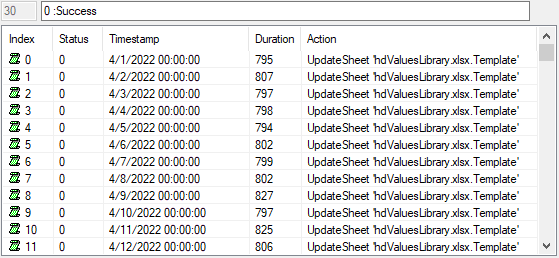 |
The list shows all the actions currently in the queue. Each row has the following settings:
Index
The index in the queue. The Schedules queue ranges from 0 to 255. The Analytics queue ranges from 640 to 767.
The queues operate as a FIFO (first in first out) and are circular meaning that after the last index is set with an action, the next action is set at the top as long as the action is not pending.
Status
The state of the action in the queue. A status of 0 means the action is processed and -1 means that the action is pending.
Timestamp
The date and time to run the action on. This is not necessarily reflective of the date and time the action was submitted to run but rather the report date and time the action is run for.
For example, if running a backfill from the Schedule Designer on a set of actions, this column reflects the backfill time submitted for every action.
Duration
The amount of time (in milliseconds) it took for the action to complete. This is updated once the Status is 0, indicating the Action is complete.
Action
The action to execute.
To clear the entire queue, which sets the Status to 0 for every row, click the Clear All Queues button in the lower left.