Conditional Summary
The Conditional Summary function generates summary values from the Base range using the Calculation(s) specified and places the results as a table at the Placement.
Settings | |
|---|---|
Condition | The Condition to apply to every column (or row depending on Direction) to derive the Calculation(s) specified). This is specified by using the Filter Browser (see Filter Range) |
Calculation (up to 5) | The Calculation to apply to every column (or row depending on direction) in the Base range. If the Direction is Down or None, each Calculation appears as a row in the Placement whereas if Direction is Across each Calculation appears as a column in the Placement. |
Add Labels | If set to Yes and the Direction is Down or None, labels for each Calculation appear to the left of the data. If the Direction is Across, labels appear above the data. |
Case Sensitive | If the Condition is textual and case is important, set Case Sensitive to Yes. |
Example
Calculate the average, maximum and minimum.

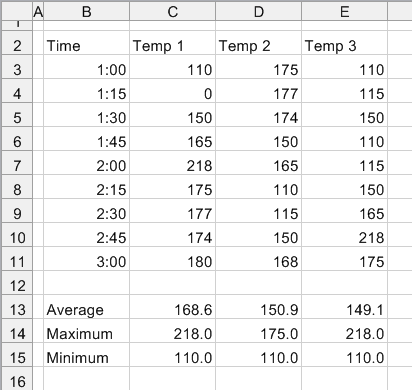
Use the settings:
Base | |
|---|---|
Cell | $C$3:$E$3 |
Direction | Down |
End | All cells are empty |
Placement | |
|---|---|
Cell | $C$13 |
Setting | Value |
|---|---|
Condition | $C > 0 |
Calculation | Average |
Calculation | Maximum |
Calculation | Minimum |
Calculation | None |
Calculation | None |
Add Labels | Yes |
Case Sensitive | No |