Designer
The Designer is launched from Install\bin\XLRdbCopyView.exe
Every configuration in the project is listed on the left side. When selected, the settings are displayed read-only on the right side.
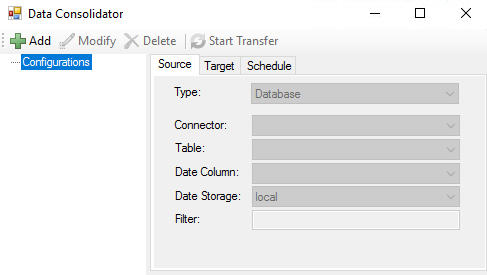 |
To create a new configuration click Add.
To modify an existing configuration click Modify.
To delete a configuration click Delete.
To start a transfer, select an existing configuration and click Start Transfer. From the Designer, data transfers occur in 6-hour increments from the start date/time established until the current time. A record of each transaction is displayed in the lower right. The transfer may be stopped at any time by clicking Stop Transfer.
Add/Modify a Configuration
The Name setting at the top defines the configuration name that is specified during runtime.
Source Tab
The Source tab contains all the settings to define where the source data to consolidate comes from. The Type setting determines the type of data to consolidate.
For Database, the following settings are available:
Connector | The connector that defines the database to get the source data from. This can be any database connector defined in the project. |
Table | The table within the database to retrieve the data from. |
Date Column | The column within the table that contains the timestamp for every record. |
Date Storage | This defines how the timestamps are stored in the date column. |
Filter | An additional filter to apply when querying the data from the table. The syntax must match the syntax of the database. For example, if the table has a Type column that defines if the record is an Alarm or an Event and only alarm records should be queried, set Filter to: Type = ‘Alarm’ |
Target Tab
Database
The Database connector that defines the target database. Any database connector defined in the project may be selected.
Table
This displays the name of the table in the Target Database. It is only displayed after it is created.
Create/Update Table
If no table has been created, a set of columns is derived from the source and displayed to create a table from. Otherwise, the columns in the existing table are displayed to update.
Each column has the following settings:
Name
The name of the column. This is not editable.
Type
The column type. This can be modified if needed. This must be a valid type in the Target Database.
Allow NULL
If checked, the column can be set with a NULL value, otherwise it cannot.
Indexed
If checked the column is indexed in the table making it faster to use in the WHERE clause of a query.
Click OK to create/modify the table.
Schedule Tab
The Schedule tab is used to define the schedule for consolidation. Use the Every setting to define the frequency.
The Transfer Start setting is used to define the start date/time when a data transfer is initiated. This setting is only available on new configurations or on an existing configuration if the Target Table has been reset or the last transfer date recorded is before the Transfer Start stored in the configuration.
After the initial transfer, this date is no longer used. Instead, the Transfer Start is the timestamp of the last record from the previous transfer.