Data Group
The following describes the historical data group settings specific to the AVEVA Historian connector.
Group Types
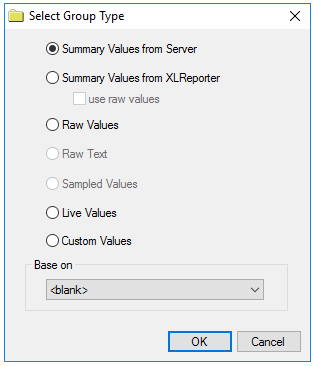 |
For AVEVA Historian the following group types are available:
Summary Values from Server
This group type retrieves summary calculations directly from the historian. For AVEVA Historian, the following calculations are available:
Sample
Average
Maximum
Time of Maximum
Minimum
Time of Minimum
Integral
Counter
Summary Values from XLReporter retrieves sampled values from the historian and performs calculations on those samples for reporting.
Note
By default, summary values are calculated time weighted and values are propagated based on the last known value. However, to change this so that summary values are calculated strictly on the data returned check use raw values.
Raw Values retrieves values logged to the historian between the start and end time specified and the retrieval options configured (see below).
Live Values retrieves the last recorded values in the historian for every selected tag.
Custom Values opens the Database Group builder where a query can be configured to retrieve data from any table available in the database connected to by the connector.
Group Settings
Setup Tab
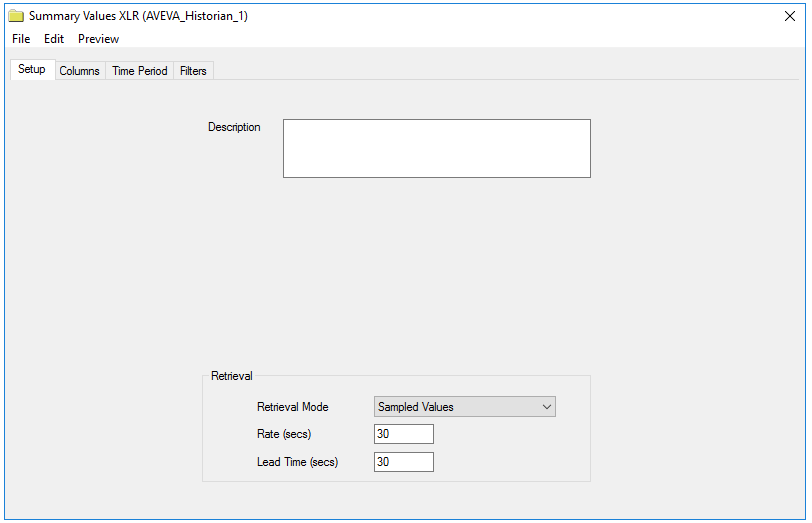 |
For Summary Values from XLReporter groups, the Retrieval settings define how data is retrieved for the calculations selected for the group. The following settings are available:
Retrieval Mode defines how data is retrieved from the historian. For AVEVA Historian Sampled Values and Raw Values are available.
Sampled Values use the Cyclic retrieval mode.
Raw Values use the Full retrieval mode. The Full retrieval mode returns an extra value at the start time that is the last recorded value before the start time. If the group is set up with use raw values checked, this extra value is disregarded for the calculations. However, if this is unchecked, this extra value is factored into the calculations.
Rate defines the interval (in seconds) that sampled values are retrieved from the historian.
Lead Time defines the amount of time (in seconds) to retrieve data before the start time.
Retrieval Tab
 |
For Raw Values groups, the Retrieval tab is provided to determine how raw data is returned. The most common Retrieval modes are Cyclic and Delta.
Cyclic retrieval mode returns equally spaced values based on either the Values spaced every or Number of values setting.
Delta retrieval mode returns values for every selected column every time the value in that column changes. The Time deadband and Value deadband settings can restrict the total amount of data returned.
For more information on these retrieval modes as well as the other available retrieval modes, see the AVEVA Historian documentation.
Filters Tab
 |
For Summary Values from Server groups, the configured filtering on this tab applies to the calculated values themselves and not to the underlying values that contribute to the calculation. For more information on the available settings, see the AVEVA Historian documentation.