Replace Range
The Replace Range function replaces all occurrences of Find What in the Apply To range with the Replace With value.
Settings | |||||||||||||
|---|---|---|---|---|---|---|---|---|---|---|---|---|---|
Find What | The value in the range to be replaced. This can either be a hard coded value (numeric or text), an XLReporter Name Type or Variable or a combination of both. To replace any blank cell with a value, leave this setting empty. | ||||||||||||
Replace With | The value in the range to replace the Find What value with. This can either be a hard coded value (numeric or text), an XLReporter Name Type or Variable or a combination of both. To replace a value with a blank, leave this setting empty. | ||||||||||||
Match Entire Cell | If set to Yes, a value will only be replaced if the entire cell matches the Find What value. If set to No, the value will be replaced if it is found within a cell. As a simple example, consider a configuration where Find What is a and Replace With is x. If the range contains 3 cells with the following values:
| ||||||||||||
Match Case | If set to Yes, when Find What is set to a textual value, case is considered when determining a match, otherwise it is not. | ||||||||||||
Example
With Find What set to 10 and Replace With set to 2 and Match Entire Cell Contents set to No, a cell containing “101” is changed to “21”.
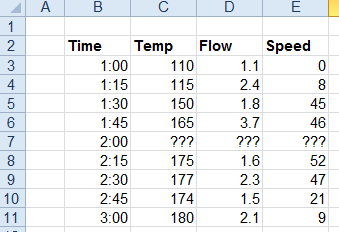
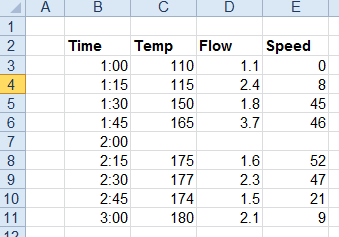
Replace all the cells containing ??? with a blank.
Apply To | |
|---|---|
Cell | $B$3:$E$3 |
Direction | Down |
End | All cells are empty |
Setting | Value |
|---|---|
Find What | ??? |
Replace With | |
Match Entire Cell | No |
Match Case | No |