Scheduler Actions
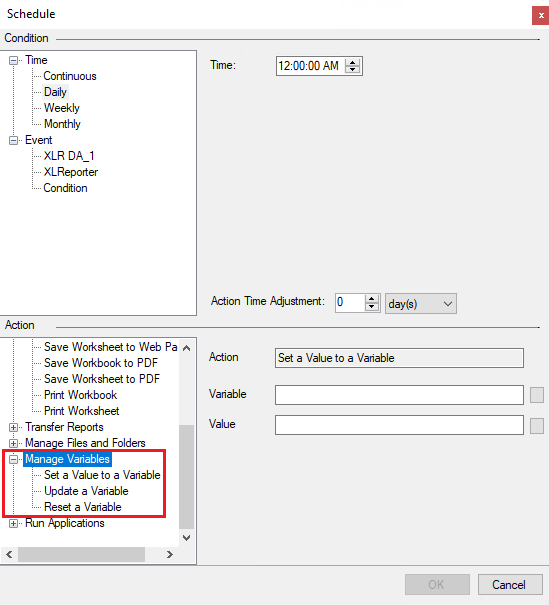
The XLReporter Scheduler has built-in actions to manipulate variables at runtime. These actions include the Set, Update, and Reset actions found under the Manage Variables action category.
 |
Set a Value to a Variable
The Set action writes a Value to the specified Variable when the condition is met. The Value can be static text, an expression (i.e. {DATIM}), or a real-time process value from a connector defined in the same project.
This action can set up to four values to four different variables via a ~ separated list.
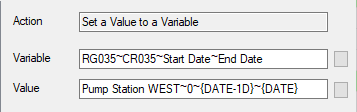 |
The configuration above would set RG035 to “Pump Station WEST”, CR035 to 0, Start Date to the previous day’s date, and End Date to the current date.
Alternatively, this action can also set a single value to an array of variables of the same type.
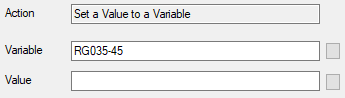 |
The configuration above would set the value of “” to Registers 35 through 45. Clearing them for the next cycle report.
Update a Variable
The Update action has two functions. It increments Counter variables according to the variable's configured Increment value (default 1). For Date Time variables, it sets the universal end date, local end date, end date, end time, Span, and Span (in days).
Reset a Variable
The Reset action, much like the update action, has two functions. As the name implies, it resets Counter variables back to their initial value. For Date Time variables it sets the universal start date, local start date, start date, and start time.
Both the Update and Reset actions can use the ~ separated lists or the CRXXX-CRYYY and DTXXX-DTYYY syntax respectively to apply the action to multiple variables.