Studio Options
The studio is available as either a ribbon item in Microsoft Excel or in the XLReporter Studio, a stand-alone application.
This is determined in the project settings. To access, from the Project Explorer select File, Project Settings, Workbook.
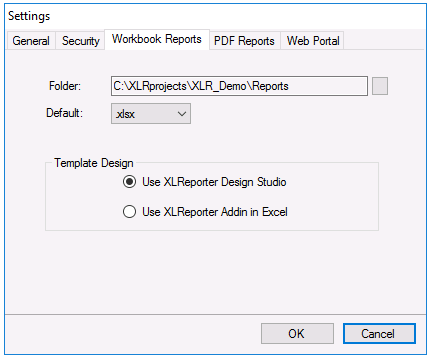 |
The studio is opened from the Project Explorer, under the Template Design section by clicking the Studio button. It is also opened by double-clicking any template listed on the left.
Excel
The Template Studio is built into Microsoft Excel so templates can harness over 400 functions, charts, and formatting capabilities in addition to the XLReporter functions that are specifically built for process automation.
This option is available for users who have a licensed copy of Excel and are comfortable in this environment. Since Excel is so universally used, any feature that is unfamiliar can be searched for on the internet with hundreds of tips, tricks, and tutorials on how to use it.
 |
XLReporter Template Studio
The XLReporter Template Studio is a stand-alone application where report and data entry form templates are designed. Virtually all the functionality of a workbook is available including functions, charts, and formatting in addition to functions that are specifically built for process automation.
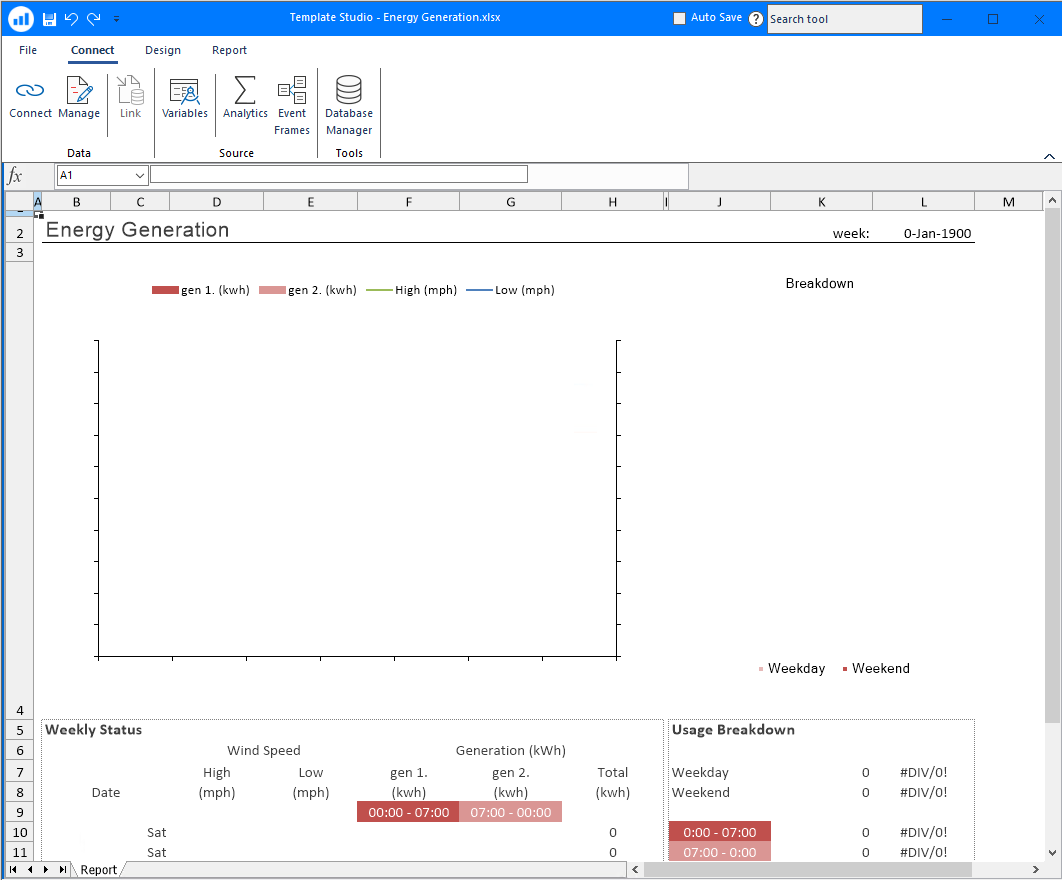 |
This option is available for users that do not have a licensed copy of Excel or those that are not as familiar with Excel and want an environment that provides that type of functionality but presented in a simpler way.
Offline Development
In many instances, XLReporter is installed on a machine on the factory floor where it is too busy to do development.
In this scenario the templates can be developed offline in the comforts of someone’s office. If the system where development is done has Excel installed, it can be used as the Design Studio. Then, when it is time to deploy, the project can be copied to the runtime system. If small modifications need to be done, they can be done using either the XLReporter Studio or Excel, giving you the best of both worlds.