Data Items
 |
The left view of the Analytic Designer displays the analytic categories. Select a category to display the configured analytics in the grid.
Group is the group number for the analytic. This number can be used to manage analytics so that they can be updated and/or stored at the same time or on the same event. For example, if the average of the Mixer temperature is required every hour but the maximum Mixer pressure is required every day, the analytic for the Mixer temperature would be configured for Group 1 while the Mixer pressure would be configured for Group 2.
By default, the group number 0 has a “global” group meaning in that any update or store on any other analytic will affect them.
Name is the name of the analytic. This name will be displayed when browsing for analytic values during the setup of a template.
Description is a description of the variable. This description will appear in the analytic browser.
Connector and Source collectively define the process value used to calculate the analytic.
To add/modify an item, select a row and double-click, click the Modify menu option or select Modify from a right click.
To remove an item, select a row and press the Delete key, click the Remove button, or select Remove from a right click.
Snapshot
A Snapshot stores the current value of numeric values from the process.
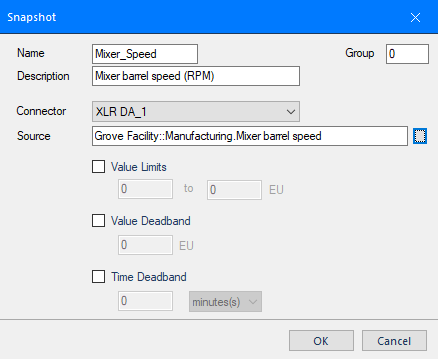 |
The Snapshot is saved with a timestamp and current value of the process using the Store action.
The analytic supports compression limits which will reduce the quantity of data stored:
Value Limits
If enabled, the value must be within the limits specified (inclusive) for it to be stored.
Value Deadband
If enabled, the value must change from the previous value by the deadband (specified in engineering units) for it to be stored.
Time Deadband
If enabled, the value is stored if the period has elapsed since the time of the last store.
The Snapshot analytic provides the following Fields:
:Stdt (data and time)
:Cval (current value)
:Qlty (value quality)
0 = Bad quality (according to the data server)
1 = Good quality
2 = Suspect quality (according to the data server)
4 = No value
8 = Bad server (e.g., could not connect to server)
Profile
A Profile analytic calculates metrics from discrete process values, such as on /off counts and on/off durations. The process value is regarded as being in the “off state” if its value is between +/-0.5 otherwise it is in the “on state”.
 |
A Profile is updated on an Update and is available for reporting on a Store.
The Profile analytic provides the following Fields:
:Stdt (start date and time)
:Endt (end date and time)
:Durn (difference between the start and end in days)
:Onct (on count)
:Onse (on duration in secs)
:Ondy (on duration in days)
:Onpt (on duration as a percent)
:Ofct (off count)
:Ofse (off duration in secs)
:Ofdy (off duration in days)
:Ofpt (off duration as a percent)
:Gcnt (count of good samples)
:Bcnt (count of bad samples)
State Profile
A State Profile calculates metrics on how long and how often process values have occurred within specified data ranges.
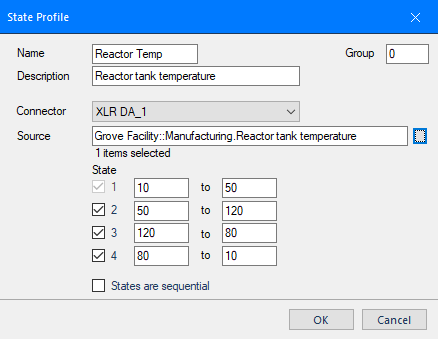 |
A State Profile is updated on an Update and is available for reporting on a Store.
Up to four State ranges can be configured. The Source is compared to each state and, if the value is in the data range, the count and duration of that state is updated. If States are Sequential is checked then the calculation is performed in a state until the Source value takes it to the next state.
The State Profile analytic provides the following Fields:
:Stdt (start date and time)
:Endt (end date and time)
:Durn (difference between the start and end in days)
:Cnt(1 to 4) (state count)
:Dns(1 to 4) (state duration in secs)
:Dnd(1 to 4) (state duration in days)
:Lov(1 to 4) (state low value)
:Hiv(1 to 4) (state high value)
:Gcnt (count of good samples)
:Bcnt (count of bad samples)
Difference
A Difference calculates metrics on the difference of an analog value taken at different times. An example would be to calculate the total from a totalizer.
 |
A Difference is updated on an Update (which updates the start timestamp) and is made available for reporting on a Store (which updates the end timestamp).
The signal Type is either increment (the Source increments such as a flow totalizer) or decrement (the Source decrements such as a weigh scale). If the Source rolls over at a certain value, then this is accounted for by specifying the Rollover (0 means no rollover). The Scale value is a constant used as a scaling factor of the result.
The Difference analytic provides the following Fields:
:Stdt (start date and time)
:Endt (end date and time)
:Durn (difference between the start and end in days)
:Dfsd (date and time of start sample)
:Dfsv (value of start sample)
:Dfed (date and time of end sample)
:Dfev (value of end value)
:Dfcv (difference between the start value and end value)
:Dfsc (difference between the start time and end time in secs)
:Dfdy (difference between the start time and end time in days)
:Type (difference type)
:Roll (rollover value)
:Conv (scaling factor)
:Gcnt (count of good samples)
:Bcnt (count of bad samples)
Statistic
A Statistic calculates statistical summaries for a process value. The values used in the calculation can be filtered by value limits.
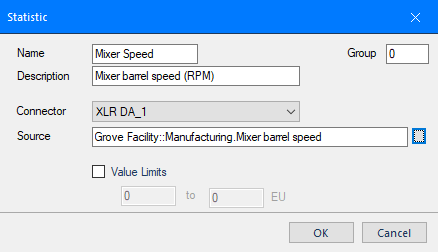 |
A Statistic is updated on an Update and is available for reporting on a Store.
The Source value is not considered unless it satisfies the compression limits:
Value Limits
If enabled, the value must be within the limits specified.
The variable provides the following Fields:
:Stdt (start date and time)
:Endt (end date and time)
:Durn (difference between the start and end in days)
:Totl (total)
:Maxm (maximum)
:Mxdt (time of maximum)
:Minm (minimum)
:Mndt (time of minimum)
:Rnge (range)
:Avge (average)
:Devn (deviation)
:Gcnt (count of good samples)
:Bcnt (count of bad samples)