Histogram
The Histogram function calculates individual and cumulative frequencies for a cell range of data and data bins. It also generates data for the number of occurrences of a value in a data set.
Settings | |
|---|---|
Bin Range | The bins are defined by setting the Bin Range. If the Bin Range is 0, every unique value in the Base range is a bin. This can be used to a get a frequency of every unique value in a range. If the Bin Range is greater than zero, then the bins are equally spaced between the minimum and maximum values of the Base. If the Bin Range is a cell range, the cell values in the range are used as bins. When specified as a cell range the range should only be 1 column wide. |
Pareto | If set to Yes, the resultant table is shown in descending order of frequency. If the Bin Range is a cell reference, is on the same worksheet and starts on the same row as the Placement cell, the resultant table is expanded to include the Bin Range as well as any other columns in between. For example, if the Bin Range is $B$4:$B$9 and the Placement is $D$4, if Pareto is set to Yes, the resultant table to sort in descending order is $B$4:$D$9. |
Place Formula | If set to Yes, the formulas remain in the Placement. If set to No, only values appear in the Placement. |
Calculation (up to 4) | In addition to frequency distribution, additional Calculation(s) can be selected which will appear as additional columns to the right of the Placement. The following are available:
|
Example
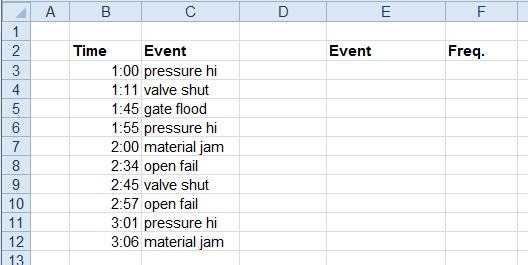
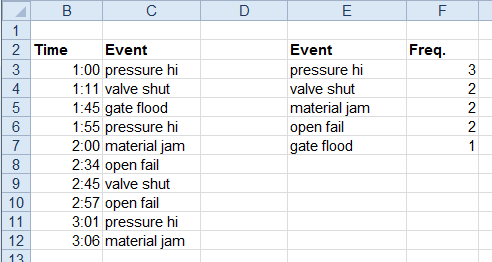
Show the frequency of process events in order of occurrence.
Base | |
|---|---|
Cell | $C$3 |
Direction | Down |
End | All cells are empty |
Placement | |
|---|---|
Cell | $E$3 |
Setting | Value |
|---|---|
Bin Range | 0 |
Pareto | Yes |
Place Formula | No |
Calculation | |
Calculation | |
Calculation | |
Calculation |