Connector
To configure the connector to the OPC HDA server, from the Project Explorer select Connect, Connectors.
Click Add
Select OPC, OPC HDA Historical values
Click OK
 |
Primary Server
These settings define the Name and Node of the OPC HDA server. Use the browse button to browse the local or remote machine to select the OPC HDA server.
Use the Test Connection button to verify a connection to the server.
Secondary Server defines an (optional) secondary historian to connect to if a connection to the Primary Server fails.
Settings
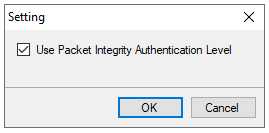 |
If the Use Pack Integrity Authentication Level is checked, when a connection is made to a remote OPCHDA server it uses the packet integrity authentication level. This must be set if the Microsoft DCOM hardening has been implemented on the system where the OPCHDA server is installed.