Define Server
Select Edit, Server to show a grid of the servers currently setup. The server in the top row is treated as the default server when designing configurations.
If a new server is required, click the pushbutton (…) in the Friendly Name column.
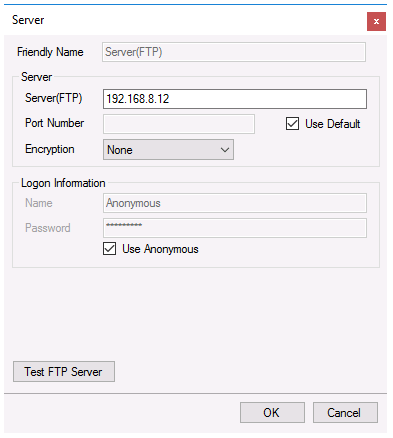 |
Enter a Friendly Name to identify the server. The Server (FTP) parameter is the path to the FTP server that will be used along with the Port Number. If the FTP server uses the default port (21 for FTP or 22 for SFTP), check Use Default otherwise specify the port number.
The Logon Information may or may not be required depending on the FTP server. Enter a Name and the Password associated with the Name specified. Note, for an SFTP server, Login Information is required.
If the server is an SFTP sever, set the Encryption to SFTP. Otherwise, set the Encryption as None or the type required by the FTP server.
A test of the settings specified is made by clicking the Test FTP Server.