Group Range
The Group Range function applies grouping to rows of data in the Apply To range when values in the Group column match based on the Group Criteria specified.
Grouping adds controls to the left of the row headers that allows you to expand or collapse one or more rows of data.
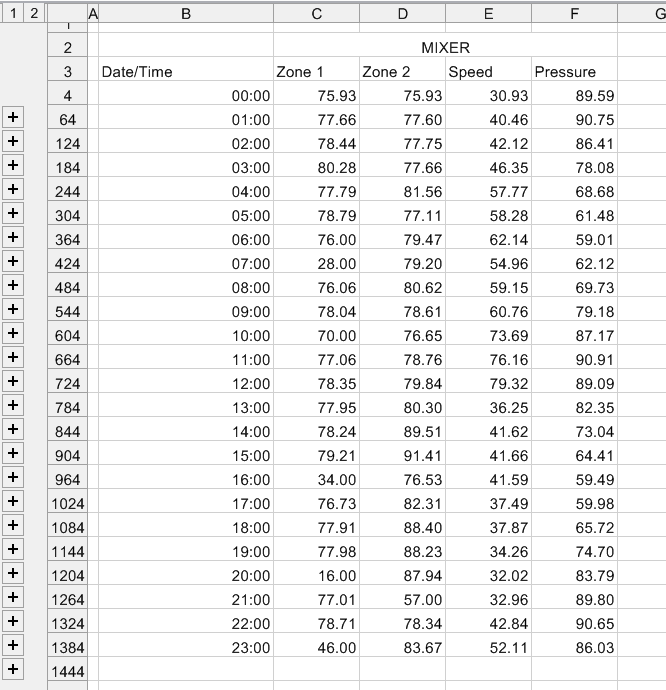 |
When applied, the initial row of data is not included in the group but any subsequent rows that match the criteria are added to the group. This makes the first row visible when the grouping is collapsed.
Settings | |
|---|---|
Group | The column on which the Group Method is applied. This should be a cell reference to the top row of the Apply To range. |
Group Method | The method by which to group the data in the Group column. The Group column can contain text, numbers, or timestamps. Text can be grouped with or without case. For numbers, grouping can be done on the Cell Value or the Cell Text. The Cell Value grouping means that values are grouped based is the underlying value in the cell with however many decimal points it has. The Cell Text grouping means the values are grouped by the value as formatted to display in the cell. For example, if the Group column has the values 2.11 and 2.12 and is formatted for 1 decimal place, the Cell Value grouping would treat these as different whereas the Cell Text grouping would condense these together as both are displayed as 2.1. For timestamps, the Group Method can be Second, Minute, Hour, Day, Month or Year to group based on an element of time. |
Initial State | This defines whether the groups are initially Collapsed or Expanded after the function is executed. |
Example
A daily report is generated. At a glance, hourly samples need to be displayed. However, if any of those values appear “out of spec”, 1-minute samples around that hour should be accessible to analyze what is going on.
To accomplish this, the group configured for the report template is set up to retrieve 1-minute samples over the day. Then, the Group Range management function is configured to group the data based on the hour of the day and to be initially collapsed. The net result is a daily report that displays hourly samples where each hour can be expanded to show the 1-minute samples for that hour.
If the data starts in cells $B$8:$H$8, the Group Range settings are:
Apply To | |
|---|---|
Cell | $B$8:$H$8 |
Direction | Down |
End | All cells are empty |
Setting | Value |
|---|---|
Group | $B$8 |
Group Method | Hour |
Initial State | Collapsed |