Set up Alarm Logs
To set up iFIX alarm logging to a database, open System Configuration, from the iFIX program group.
Select Configure, Alarms to open the Alarm Configuration window.
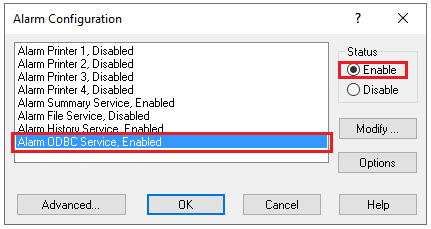
Select Alarm ODBC Service.
Set Status to Enable.
Click Modify to open Alarm ODBC Service Configuration.
Click Configure to view and edit the settings.

Select the Database Type and the Database Identifier (DSN)
Click Create Table Now.
Specify the columns to configure. Be sure to select Native Date/Time In and Native Date/Time Last in Column Configuration.
Click OK to save the configuration.