Set up DataStore Plus
The DataStore Plus ActiveX control is used to collect data in comma separated values files (CSV files).
In FactoryTalk View Studio – Machine Edition, place the ME DataStore Plus ActiveX control on a display that cannot be closed by a user.
*If this control is not available, it may need to be registered.
Double-click the control to view its properties.
General Tab
The General tab settings determine when csv files are created.
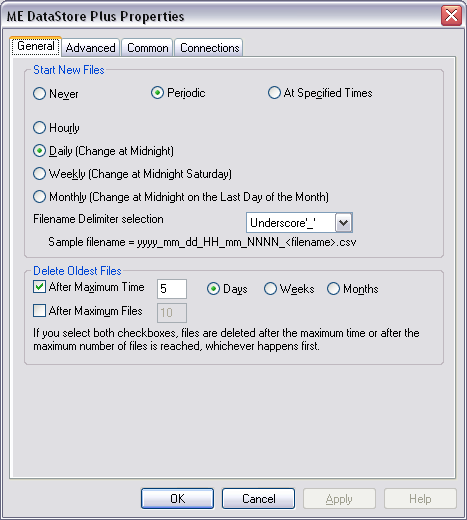 |
To optimize reporting runtime, enable the following:
Start New Files either Periodic (Hourly or Daily) or At Specific Times.
Delete Oldest Files value longer than the transfer rate scheduled for the Connector.
Advanced Tab
The Advanced tab settings determine when the data is logged.
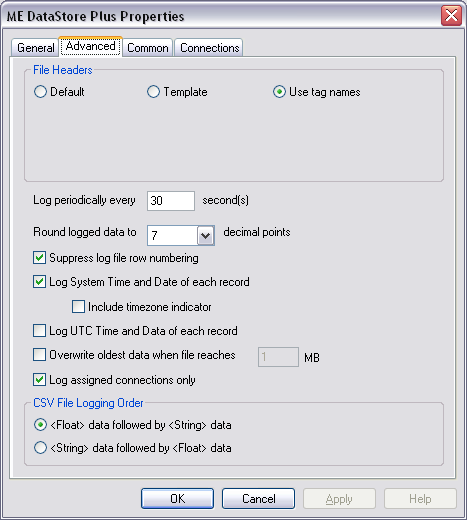 |
For File Headers select Use tag names.
Enable Suppress log file row numbering.
Enable Log System Time and Date for each record.
Enable Log assigned connections only.
Connections Tab
The Connections tab settings determine what data is logged and where the csv files are saved.
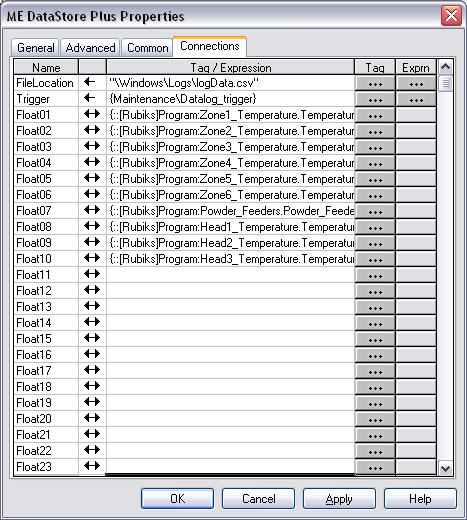 |
The FileLocation setting determines both where the csv files are located as well as the fixed text portion of the naming convention. It is important that this location is configured to a folder that is accessible either from the local network or via FTP for XLReporter to have access to these files.
The Trigger setting is typically set to a tag that determines if data should be logged. Only when the value of the tag is non-zero will data be logged to the CSV file. Use this setting if logging needs to be performed for cycles such as the production of a batch or a machine cycle.