Connector
To configure the connector to the Plant SCADA OPC UA server, from the Project Explorer select Connect, Connectors.
Click Add
Select AVEVA, Plant SCADA Real-time values (OPC UA)
Click OK
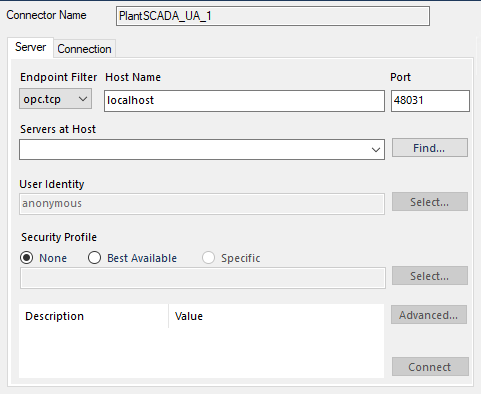 |
Under the Server tab, for Host Name, select or enter the name or IP address of the machine where the server is running. For Port specify the Port Number in the Configuration. This is typically 48031.
For Servers at Host click Find and then choose the one that starts with PlantSCADOPCUAService@
For User Identity click Select to specify.
Anonymous can be used if the Anonymous Logon setting is enabled in the Configurator.
Security Profile defines the endpoint to connect to for the Plant SCADA OPC UA Server. Select the profile that matches the Configurator. To use a specific endpoint, select Specific and click the Select button.
Click Get Endpoints to get the list of available endpoints, select the one that best fits with the server settings and click OK.
Click Connect to ensure connectivity. This may require an exchange of certificates between the client and the server. If prompted to exchange, click Yes. This action requires Windows administrator rights.
If the Connect fails, be sure that the client certificate is trusted by the server and then attempt to Connect again.