Templates Using Event Frames
On-Demand
If the Use Event Frame for Report Period option is checked for an On-Demand template, the template is deployed with a list of event frames. A selection in the list causes the start/end dates to be the Period of the generated report.
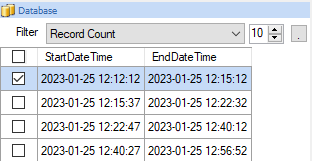 |
The list of event frames is presented in the Database Panel.
Event Frame Definition
An Event Frame is defined using the Event Frame designer. An example configuration is as follows:
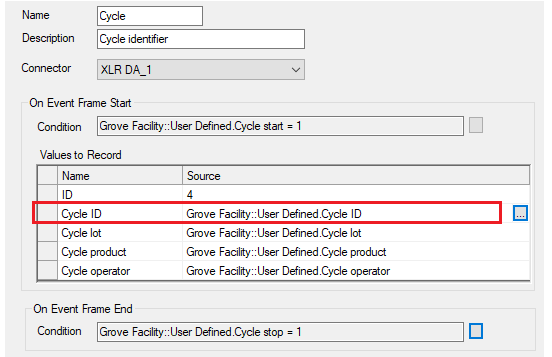 |
In the above, the Name Cycle is used in various places in the template.
Scheduled
If the Use Event Frame for Report Period option is checked for a Scheduled template, the Period is configured to use the start and end date/time of the selected event frame. Using the example above:
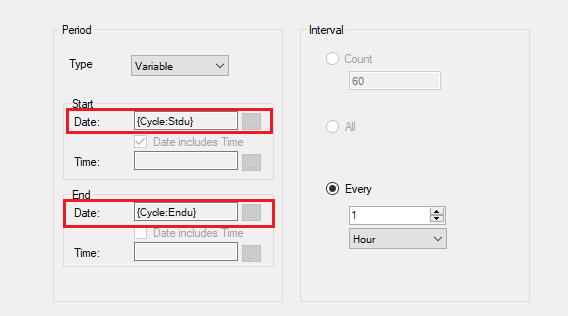 |
The fields Stdu and Endu represent the start/end of the frame.
If the template is configured to be scheduled, the Report Names WORKBOOK is set up to use a variable which is given a value in the scheduler.
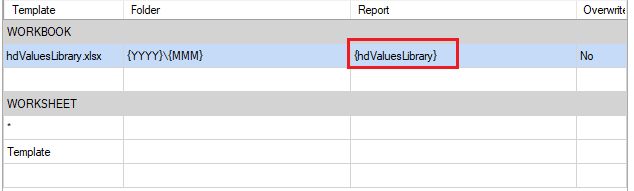 |
The Schedule is set up to set that variable to the first value recorded for the template.
 |
The variable is assigned the value at the end of event frame.
The report is produced at the end of the event frame with a delay of 5 seconds to ensure the event frame information is complete.
 |