Summarize Range
The Summarize Range management function is used to summarize a table of raw data based on an Interval specified. For example, if the worksheet contains 1-minute raw samples over day, this function can derive hourly calculations for those samples.
The Formulas for the first “set” of calculations are configured on the sheet and from there the subsequent formulas are derived and added to the report. If you do not require a summary formula like Average or Max, but rather, want to show the value every X number of seconds, this function can do that. For the “formula”, enter the top cell you want to show surrounded by parenthesis, e.g., (B3). This can also be used to show the timestamp at the beginning of each Interval.
Setting | |
|---|---|
Formulas | The range of cells containing the Formulas to use for the function. |
Interval | The Interval to apply to the cell references in the Formulas to derive the summaries. This can be a hard coded value or a cell reference. |
Place Formula | If set to Yes, the formulas remain in the worksheet, otherwise the formulas are removed so that only the values remain. |
Apply Formatting | If set to All, the formatting applied to the Formulas range is applied to all other rows (or columns). Otherwise, no formatting is applied. |
Example
Show the hourly average of 2 temperatures from 1-minute raw data.
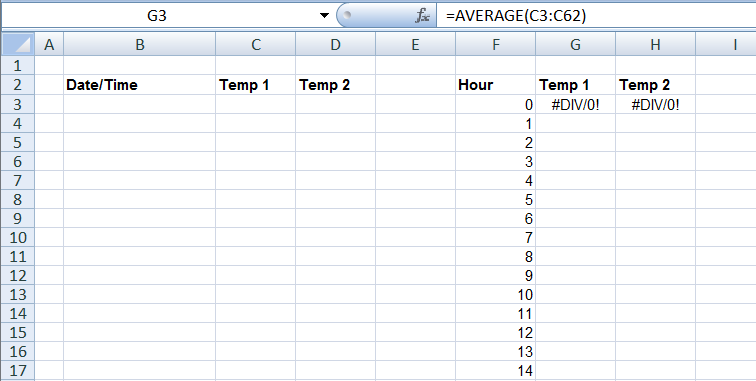
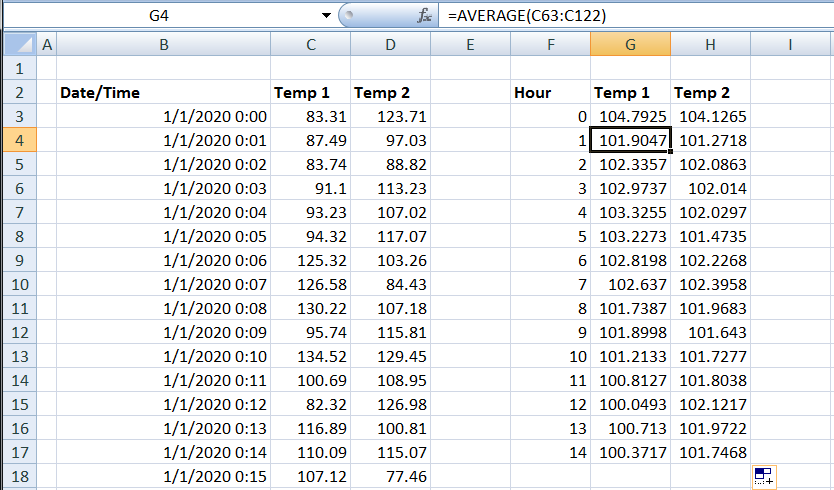
Base | |
|---|---|
Cell | $B$3:$D$3 |
Direction | Down |
End | All cells are empty |
Setting | Value |
|---|---|
Formulas | $G$3:$H$3 |
Interval | 60 |
Place Formula | Yes |
Apply Formatting | All |