Connector
To configure the connector, from the Project Explorer select Connect, Connectors.
Click Add
Select AVEVA, PI Historian (OLEDB)
Click OK
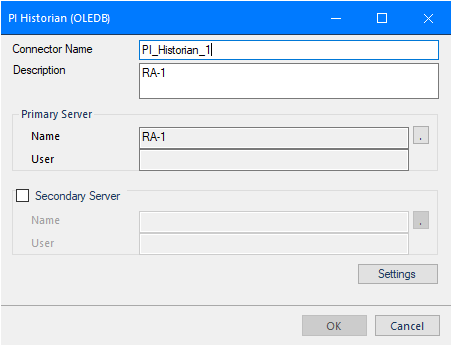 |
Primary Server
This defines the connection to the PI OLE-DB or PI ODBC server for the historian. Click the browse button (…) to define.
OLEDB
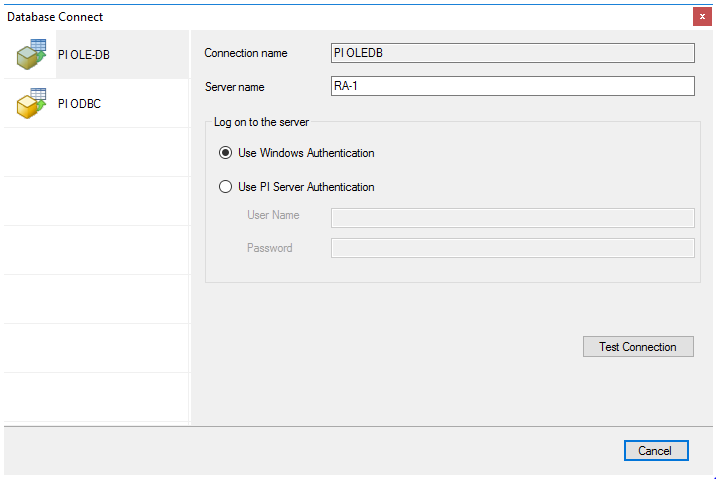 |
For the PI OLEDB provider set the Server name to the name of the machine where the historian is installed and running.
To Log on to the server you can use the current windows user or specify a user configured in the Historian as part of the PI System Management Tools.
ODBC
For the PI ODBC driver, set PI Data Source Name to a Data Source Name (DSN) configured on the system. The DSN can either be set up for All Users (System DSN) or the Current User (User DSN). If you have not already configured a DSN to the PI server, click New to create one. Note, for All Users you must have Administrator credentials.
When configuring the PI ODBC Data Source, under the PI Server settings, set Name to the name of the machine where the PI server is installed and running. If Perform explicit login using PI username and password is checked, back in the Connector dialog you will have to Use PI Server Authentication and specify a User Name and Password set up in the PI System Management Tools.
If you are retrieving integer values from the historian, set Interval Values as to VALUE, otherwise you get the STATUS (i.e., quality) returned rather than the value for each integer tag.
Under Aggregate Timestamp, be sure to select Start of Interval as XLReporter timestamps all historical data with the start of the interval.
Secondary Server
These settings define the (optional) secondary Historian to connect to if a connection to the Primary Server fails.
Settings
The Settings button opens the Settings dialog that defines characteristics of the database that are used to retrieve data.
 |
Typically, these settings are defaulted correctly based on the Primary Server.
If queries timeout, increase the Client Wait Time.
The delimiter and timestamp settings are typically filled in automatically for the database and can be modified for other databases.
The Date/Time Storage settings define how timestamps are stored in the database. Using this setting the timestamps are manipulated when data is retrieved so that local timestamps are submitted in and returned.
Many databases require the Date format to be YYYY-MM-DD so that no interpretation needs to occur based on the Region settings of the Windows Operating System. It is recommended to always have this option checked.