ALARM RATE
The Alarm Rate sub report calculates the new alarm counts over two custom alarm periods either: 10 minutes and 1 hour. It expresses the output in four threshold groups, each with a configurable label and count interval.
Settings
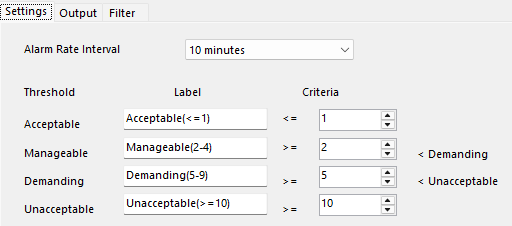 |
Alarm Rate Interval
Interval to calculate alarm rate counts over, 10 minutes or 1 hour.
Thresholds
For each time period, four thresholds are specified. Each threshold consists of a textual label, a low limit and a high limit.
The alarm rate count is calculated and compared to the low/high limits to determine which threshold to increment.
Output
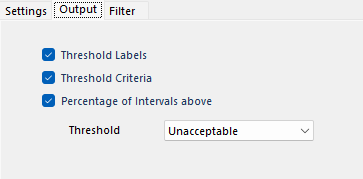 |
Output options include:
Threshold Labels
If checked, threshold labels are returned with the metrics.
Threshold Criteria
If checked, threshold criteria are returned with the metrics.
Percentage of Intervals above Threshold
If checked, a percentage of intervals above the selected threshold is returned with the metrics.
Filter
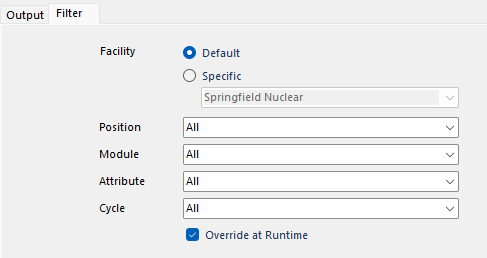 |
This tab defines filters that are applied to the sub report metric.
Facility
The facility to get the data from. This can be the Default as defined in the connector or a Specific facility defined in the connector.
Position
Operator Position filter to apply to the sub report metric. Every Operator Position filter defined in the connector is available to select.
Module
Module filter to apply to the sub report metric. Every Module filter defined in the connector is available to select.
Attribute
Attribute filter to apply to the sub report metric. Every Attribute filter defined in the connector is available to select.
Cycle
Cycle filter to apply to the sub report metric. Every Cycle filter defined in the connector is available to select.
Overwrite at Runtime
If checked, if filters are specified either On Demand or in the Schedule, the filters set here take precedence. Otherwise, the filters specified in On Demand or the Schedule take precedence over what is set here.