Remote Connectivity
To access data from the Geo SCADA OPC DA server remotely, the Geo SCADA Expert Data Access Components need to be installed on the machine where XLReporter is installed.
To install, run the Geo SCADA Expert installation. Under Choose Setup Type, select Custom.
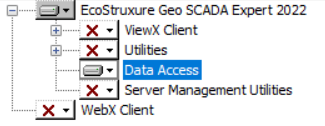
In Custom Setup, only install Data Access (e.g., select every other option and choose Entire Feature will be unavailable).
After installing the Data Access Components, from the EcoStruxure Geo Scada program group open Configure Connections.
In the Geo SCADA Expert Client, click Add.
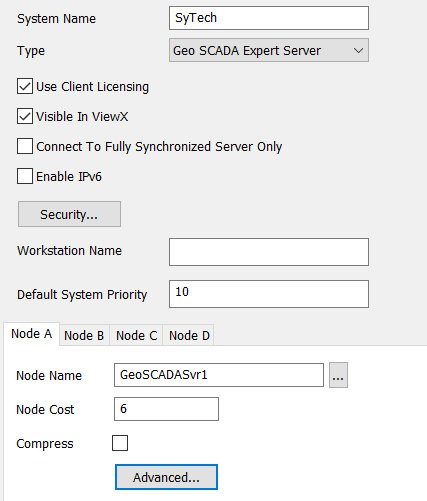
Set System Name to the same System Name configured on the Geo SCADA server machine. Under the Node A column, set Node Name to the Name or IP address of the Geo SCADA server machine.
This now sets up an OPC DA Server for Geo SCADA on the client machine which in turn accesses data from the Geo SCADA server on the network.