Event Frame Designer
The Event Frame Designer is used to configure Event Frames and the corresponding database storage options. The designer is opened from the right-side Tools tab of the Project Explorer in the Connect section by selecting Event Frames.
 |
The display consists of a Data Items tab.
To save changes click File, Save. If the Scheduler is running, it is automatically reloaded with any changes.
The Storage option shows where the Event Frame values are stored. This can be disabled by unchecking Enable.
 |
The Backup Path is used to cache values in the event of communication failure. When communication is re-established, the cache is forwarded to the database of the Connector.
Data Items
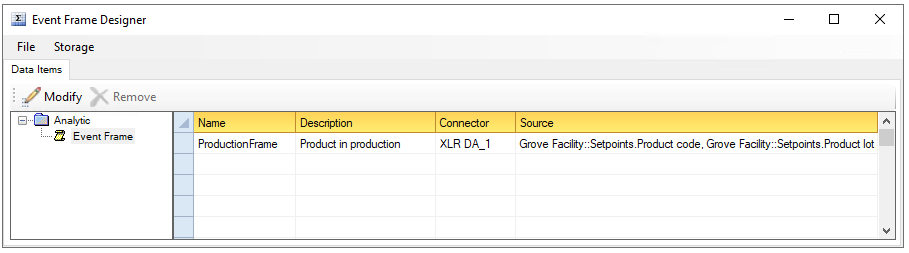 |
Name is the name of the event frame. This name will be displayed when browsing for event frame values.
Description is a description of the event frame. This description will appear whenever event frames are browsed.
Connector and Source collectively define the process value used to calculate the event frame.
To add/modify an item, select a row and double-click, click the Modify menu option or select Modify from a right click.
To remove an item, select a row and press the Delete key, click the Remove button, or select Remove from a right click. Note, the Event Frame Designer configuration is saved automatically after selecting Remove.
Event Frame
An Event Frame stores the timestamps of two events together with the current values of the process at the time of the first event.
 |
The On Event Frame Start shows the Condition to monitor to signify the start. Click the browse button […] and define the condition trigger. When the condition is triggered, the date/time and the Values to Record are read from the process and made part of the frame.
 |
The On Event Frame End shows the Condition to monitor to signify the end at which time the date/time is made part of the frame and the Event Frame is complete. Click the browse button […] and define the condition trigger.
For more information on condition Triggers, see the Schedule Design documentation.
If Event Frames are stored to a database, they will be stored in a fashion similar to the following:
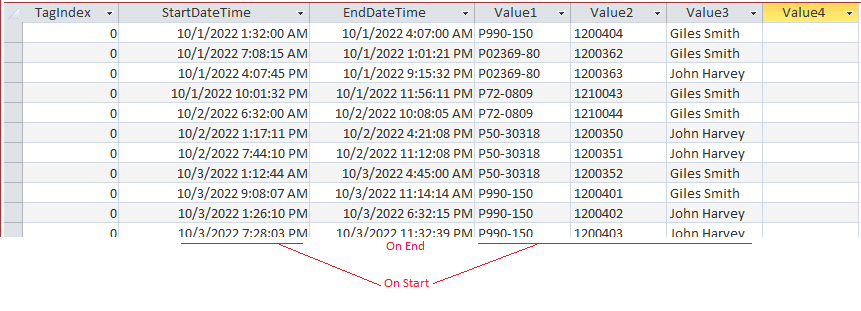 |
Event Frames provide the following Fields:
:Stdu (start date and time in universal format)
:Endu (end date and time in universal format)
Up to 4 custom fields referenced by the Name given to the value in the Event Frame definition.