Descriptive Statistics
The Descriptive Statistics function generates statistical values from the Base range using the Statistic(s) specified and places the results as a table at the Placement.
Settings | |
|---|---|
Statistic (up to 6) | The statistic to derive for each column (or row depending on the Direction). The following are available:
|
Add Labels | If set to Yes and the Direction is Down or None, labels appear to the left of the data. |
Place Formula | If set to Yes, the formulas are left in the Placement. If set to No, only the values appear in the Placement. |
Example
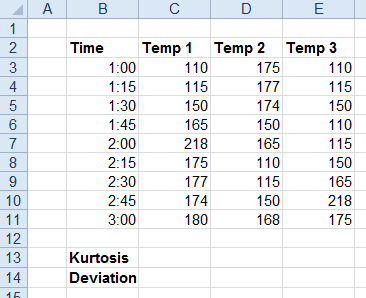
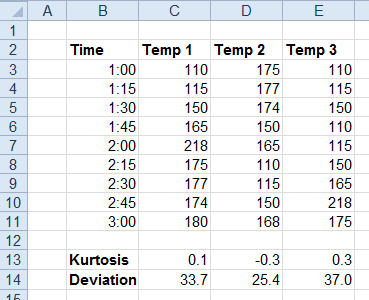
Calculate the kurtosis and standard deviation of temperatures.
Base | |
|---|---|
Cell | $C$3:$E$3 |
Direction | Down |
End | All cells are empty |
Placement | |
|---|---|
Cell | $C$13 |
Setting | Value |
|---|---|
Statistic | Kurtosis |
Statistic | Standard Deviation |
Statistic | |
Statistic | |
Statistic | |
Statistic | |
Add Labels | No |
Place Formula | No |
Exponential Smoothing
The Exponential Smoothing function is used to smooth out irregularities (peaks and valleys) to easily recognize trends.
The function uses the smoothing constant (α) which is associated with the Damping Factor (1- α). The larger the damping factor, the more the peaks and valleys are smoothed out. The smaller the damping factor, the closer the smoothed values are to the actual data points.
Settings | |
|---|---|
Damping Factor | The smoothing constant to apply. This can be a fixed number or a cell reference which contains the Damping Factor to apply. |
Standard Error | If set to Yes, a Standard Error column is added to the Placement. |
Place Formula | If set to Yes, the formulas for the smoothing as well as the Standard Error (if included) remain in the Placement. If set to No, only values appear in the Placement. |
Empty Cell Padding | If set to Yes, the values written to the Placement Cell start one row down or one column to the right (depending on Direction). Otherwise, values start at the Placement cell itself. |
Example
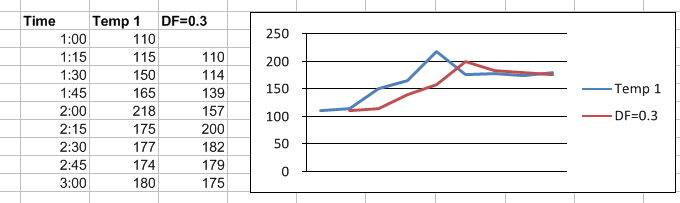
Smooth the trend of a temperature
 |
Base | |
|---|---|
Cell | $C$3 |
Direction | Down |
End | All cells are empty |
Placement | |
|---|---|
Cell | $D$3 |
Setting | Value |
|---|---|
Damping Factor | 0.3 |
Standard Error | No |
Place Formula | No |
Empty Cell Padding | Yes |