Overview
The Email and SMS application is used for the sending of Email and SMS (text messages through Simple Messaging Service) as well as MMS (text messages through the Multimedia Messaging Service), automatically or on-demand. A common use of the application is to email process reports to various departments.
The application supports direct SMTP connectivity through mail platforms like Gmail, Yahoo, and others.
If XLReporter is not installed on a machine that does not have internet connectivity, the application can be configured to connect to either the SmartSights Email Gateway or if you have a bundled package, can connect to the WIN-911 Email Module. This is the recommended way to send email using an Office 365 account even if the machine where XLReporter is installed can connect directly to the internet.
The main window of the application is opened from the Project Explorer in the right-side Tools tab by selecting Distribute, Email and SMS.
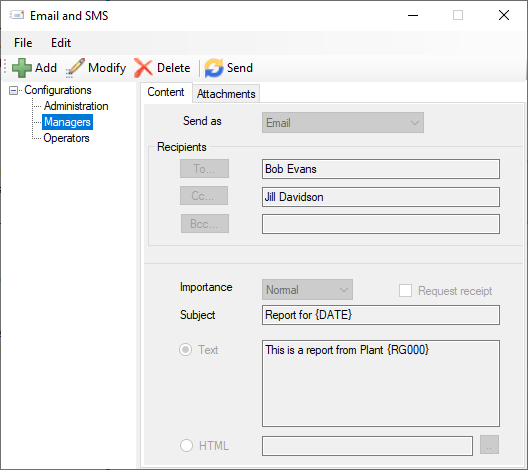 |
The display consists of menu options, a left panel of configurations and a right panel showing the content of the selected configuration.
To edit an existing configuration, highlight it on the list and click Modify. If the configuration name is edited, then the settings will be saved to this new name.
To delete an existing configuration, highlight it on the list and click Delete.
A Configuration requires information on the email server and also email addresses of recipients. This information is setup from the Edit, Servers and Edit, Contacts menu options. Once setup, the configuration is based on this information
The steps required to implement Email and SMS are:
Setup the Email Server and Contacts
Design a Configuration
Deploy a Configuration for automated emails