Options
Options are used to configure the Display and Content settings of On Demand Reports.
Display
 |
Keep display on top
This option makes the application the topmost window. Use this setting if this is launched from an HMI display.
Appearance
Side Panel
If checked, the side panel is shown.
Menu Bar
If checked, the menu bar is shown.
Override
These settings override the settings saved in the workbook template.
Worksheet headings
This option displays headings (e.g., row numbers and column letters) on the right side of the application.
Worksheet formula bar
This option displays the formula bar above the worksheet.
Worksheet grid lines
This option displays gridlines in the worksheet.
Content
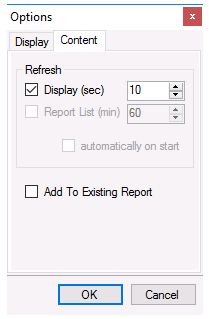 |
Refresh
Display (sec)
If enabled, when the report is refreshed it will continue to be refreshed automatically at the interval specified (in seconds).
Note that this functionality is not available from Windows Team Clients.
Add To Existing Report
When checked, if the report exists in the project it is opened and data is added to it. Otherwise, a new report is created from the template every time Refresh is clicked.
If Refresh Display is enabled and this is unchecked, the first refresh creates a new report template. Every automatic refresh afterwards adds to the existing report.