ALARM FLOOD
The Alarm Flood sub report provides a list of all the occurrences of alarm floods. An alarm flood is configured with a start condition and end condition. The standard is the start condition is more than 10 new alarms in 10 minutes and the end condition is less than 5 new alarms in 10 minutes per operator.
Settings
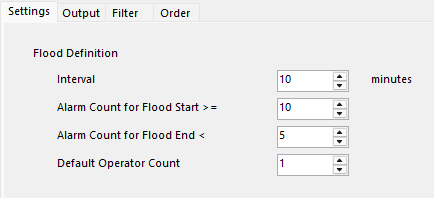 |
Interval
The number of minutes over which to evaluate if an alarm flood has occurred.
Alarm Count for Flood Start >=
The minimum number of alarms that determine the start of a flood for a single operator.
Alarm Count for Flood End <
The maximum number of alarms that deterine the end of a flood for a single operator.
Default Operator Count
The default number of operators to consider when determining a flood. This value can be overridden at runtime by setting the Operator Count variable.
Output
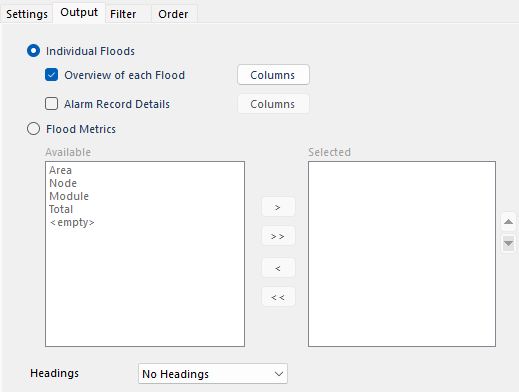 |
This subreport can produce either indiviual flood data or metrics on all the floods over the report period.
Individual Floods
Overview of each Flood – for each flood detected over the reporting period an overview with information about the flood is returned. The Columns button provides a list of columns to return for the overview.
Alarm Record Details – for each flood, a list of every alarm that occurred during the flood are returned. The Columns button provides a list of columns to return for the details of each alarm.
Flood Metrics
Metrics for all the floods that occurred over the reporting period are returned. Available has a list of all the available columns for the metrics. Use the buttons in the middle to add to the Selected list.
Headings
If a heading is written for each selected item.
No Headings
No headings are written to the report
At Runtime
Headings are written to the report when the report is generated
At Deign Time
Headings are written to the report when the data connection is configured if the cells where the headings go are blank.
Filter
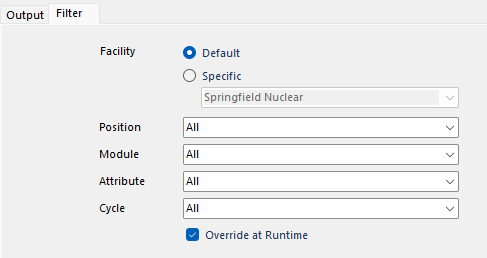 |
This tab defines filters that are applied to the sub report metric.
Facility
The facility to get the data from. This can be the Default as defined in the connector or a Specific facility defined in the connector.
Position
Operator Position filter to apply to the sub report metric. Every Operator Position filter defined in the connector is available to select.
Module
Module filter to apply to the sub report metric. Every Module filter defined in the connector is available to select.
Attribute
Attribute filter to apply to the sub report metric. Every Attribute filter defined in the connector is available to select.
Cycle
Cycle filter to apply to the sub report metric. Every Cycle filter defined in the connector is available to select.
Overwrite at Runtime
If checked, if filters are specified either On Demand or in the Schedule, the filters set here take precedence. Otherwise, the filters specified in On Demand or the Schedule take precedence over what is set here.
Order
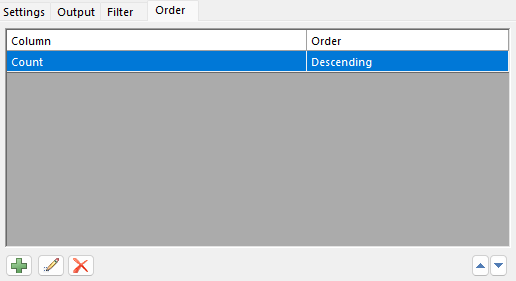 |
The order of how records are returned from this subreport.