PDF Reports
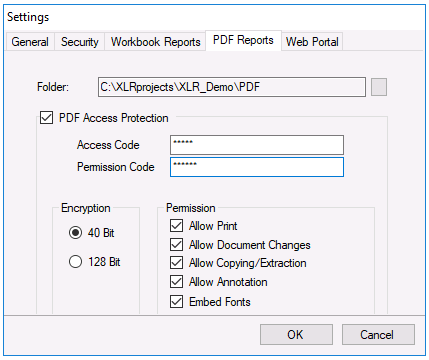
Specify the Folder where reports in PDF format are saved and, optionally, to enable PDF security. When selecting the Folder, if the last folder is not named PDF, a PDF folder is appended to the Folder path.
 |
By default, PDF files are generated without Access Protection, meaning there are no restrictions on them beyond what is applied by the operating system.
With PDF Access Protection enabled, PDF files can be password-protected and/or accessible with limited Permissions. The Permission settings determine the features available when the document is opened in a PDF viewing application like Adobe Reader.
To assign Permissions, the Access Code and Permissions Code must either both be configured, or both must be unassigned. In the case that both are left blank, there will be no password prompt to open PDF reports, but the file permissions will be set as configured. If both codes are configured, the Permission Code will open the PDF with limited permissions, and the Access Code will open it with unrestricted permissions. In this case the two codes must be set to different values. If both codes are set to the same password the Access code permissions are set.
Embed Fonts is always enabled to include TrueType and Type1 (Postscript) fonts used in the document. This results in larger files but ensures portability across PDF viewers.
PDF reports are produced automatically using the Save Workbook to PDF and Save Worksheet to PDF actions from Scheduler or the Save option in On Demand Reports and PDF Report Viewer.
Any changes to the PDF security apply to any PDF reports created after the changes are made.
XLReporter’s PDF Viewer adheres to the following PDF Settings:
Access and Permission Codes – if either is set, when the report is selected, you are prompted to enter it in order to view it.
Allow Print – If unchecked, the print option in the viewer is not enabled. It does not matter if this option was enabled when the PDF report was published, if it is set in the project, the print option is disabled.
Allow Copying/Extraction - If unchecked, the text selection options in the viewer are not enabled. It does not matter if this option was enabled when the PDF report was published, if it is set in the project, the text selection options are disabled.