User Accounts
In order to access the XLReporter site, the active XLReporter project must have user accounts enabled. Open User Accounts from the Project Explorer, on the right-side Tools menu under the Security section.
Enable user accounts by specifying an Administrator password. Be sure to record that password as it is required to access user account settings.
Mobile Gateway
The Mobile Gateway settings are accessed from the Mobile Gateway button in the dialog.
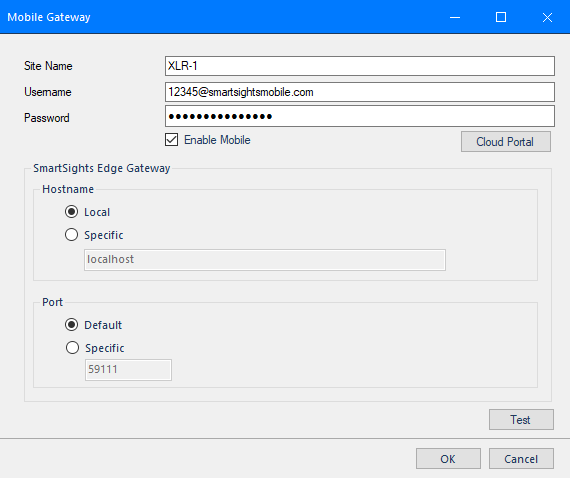 |
At the top, give the site a Name and enter the Username and Password based on the account information provided along with the account password set up in the previous section.
For SmartSights Edge Gateway, set the Hostname to the machine name or IP address where the Edge Gateway is installed on the network. If the Edge Gateway is installed on the local machine, select Local.
Unless the Port for the Edge Gateway has been changed manually, leave it as Default.
The Test button is provided to verify the settings and validate connectivity.
User Accounts
Once the settings are configured, any user account added/modified and set with an email address will have an invitation sent to them inviting them to use the site.