Moving Average
The Moving Average function projects values in the forecast period, based on the average value of the variable over a specific number of preceding periods. A moving average provides trend information that a simple average would mask. Use this to forecast sales, inventory, or other trends.
Settings | |
|---|---|
Interval | The number of preceding values to consider for the Moving Average. This can be a fixed number or a cell reference. |
Standard Error | If set to Yes, a Standard Error column is added to the Placement. |
Place Formula | If set to Yes, the formulas for the average as well as the Standard Error (if included) remain in the Placement. If set to No, only values appear in the Placement. |
Empty Cell Padding | If set to Yes, the values written to the Placement Cell start at the end of the first interval down or to the right (depending on Direction). Otherwise, values start at the Placement cell itself. |
Example
Show the moving average and standard error of a temperature.
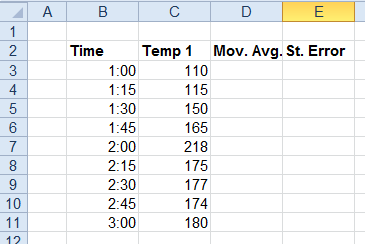

Base | |
|---|---|
Cell | $C$3 |
Direction | Down |
End | All cells are empty |
Placement | |
|---|---|
Cell | $D$3 |
Setting | Value |
|---|---|
Interval | 3 |
Standard Error | No |
Place Formula | No |
Empty Cell Padding | Yes |