Connector
To configure the connector to InTouch Historical values (classic), from the Project Explorer select Connect, Connectors.
Click Add
Select AVEVA, InTouch Historical values (classic)
Click OK
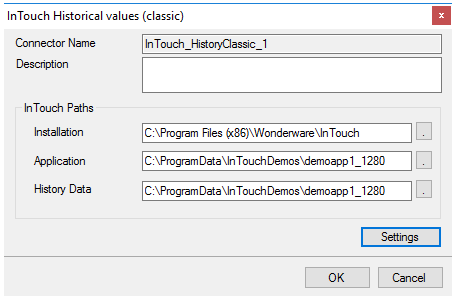 |
This connector requires the following InTouch Paths:
Installation
The path where InTouch is installed on the local system.
Application
The path where the running InTouch project is located on the local system. This can be found at the top of the WindowViewer window.
History Data
The path where the InTouch historical data files (.lgh) are located.
Settings
The Settings button is used to update tuning parameters if there are issues retrieving data from this connector.
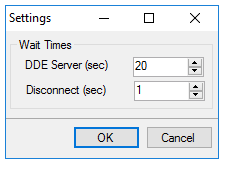 |
The following Wait Times can be configured:
DDE Server
The number of seconds the reporting engine will wait for the InTouch HisData DDE server to return the historical data requested.
This setting only needs to be changed if time out errors are triggered when a data group is updated.
Disconnect
The number of seconds the reporting engine will wait after disconnecting from the InTouch HisData DDE server. This is useful when a report contains multiple data groups retrieving data historical data from InTouch because it ensures the DDE server is closed between each request.
This setting only needs to be changed if reports with multiple data groups are triggering errors that the DDE server failed to start or connect.