Overview
Event Frames are determined from live values of the process by monitoring a start and end event, such as the start/end of a batch, start/end of a machine cycle, or the start/end of a production phase.
Event Frames can be recorded to a database so that a history of their values is available for reporting purposes, for instance, in Stacked Reports (please refer to the Stacked Report documentation).
Event Frames monitor two events. The first event captures the start date and time along with process values (Update action) and the second event captures the end date and time (Store action) which makes the frame complete.
After a Store, the current values of the Event Frame are available for reports using a Variable connection.
Event Frames require the Analytic Connector to be created. From the right-side Tools tab of the Project Explorer, in the Connect section, select Connectors.
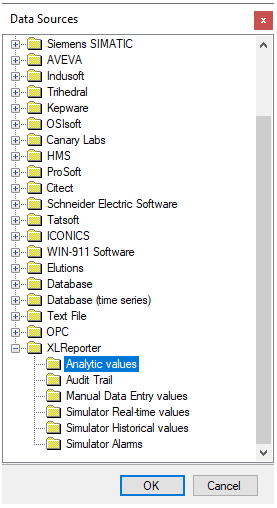 |
Choose XLReporter, Analytic values
Click OK to open the connector configuration.
Select the [.] button next to the Primary Database Type, this will open the Database Connect window.
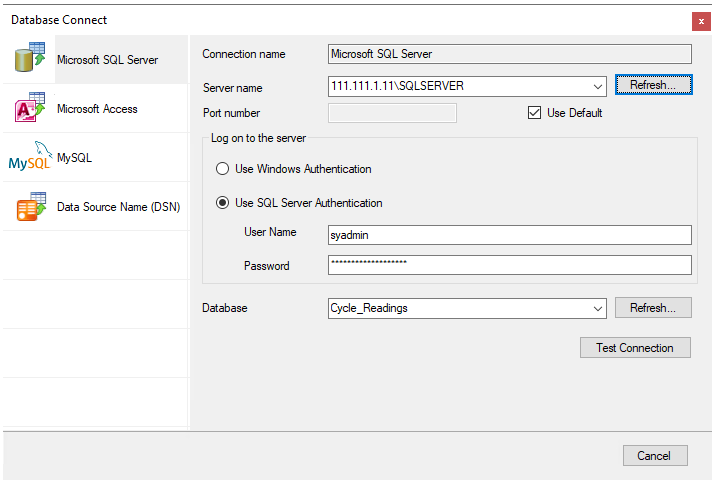 |
If possible, use a Microsoft SQL Server (including Express) database. Alternatively, a Microsoft Access database is included in the Data folder of your project which can be used to store analytic values. Click Test Connection to verify database connectivity.
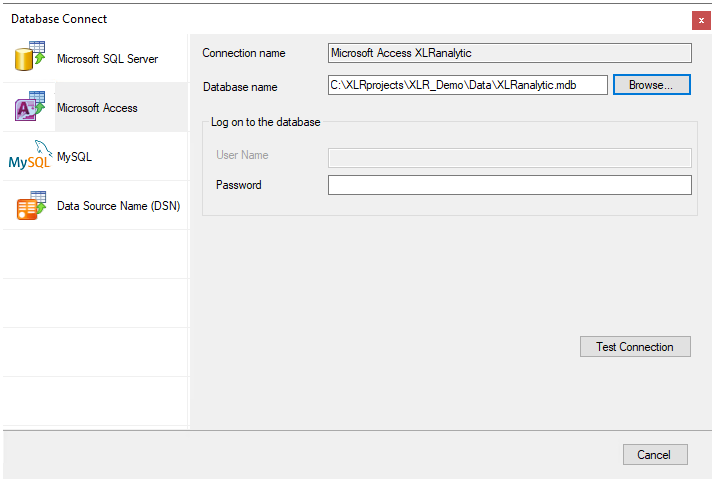 |
On the OK of the data connector configuration, the required event frame tables will be created in the database.
If a history of Start and End times is not required to be stored to a database, it is recommended to instead utilize Date Time Variables instead. For more information, see the DESIGN, Variables document in the Document Library.