Audit Trail
The audit trail maintains a log of user activity for the:
Alteration of security settings
Application of an electronic signature (when Electronic Signatures are enabled)
Modification of a configuration file (when File Version Control is enabled)
The component requires the Audit Trail connector to be defined. To view the user activity, the Audit Trail Viewer is provided.
If User Accounts is not enabled, then the Local user is used in the messages of the activity log.
If User Accounts is enabled, then the active username is used.
Enable Audit Trail
From the Project Explorer, in the Tools tab in the Connect section open Connectors. Add a new connector by selecting XLReporter data sources and then Audit Trail.
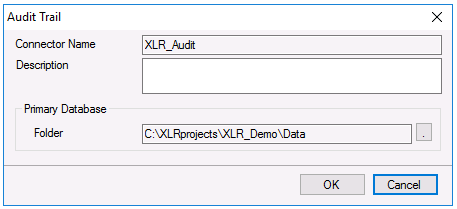 |
The audit trail database called Audit.xdb is created in the Data folder of the project. Select the browse […] for a different forlder.
If the database already exists, a prompt to recreate the table(s) in the database will appear. Note that recreating tables will cause all existing content to be erased.
For reference, the addition of the connector to the project is also shown in the Security settings. From Project Explorer, select File, Settings, Security.
Audit Trail Viewer
The audit trail content can be viewed using the Audit Trail Viewer. From the Project Explorer, in the right-side Tools tab, in the Diagnostics settings select Audit to view.
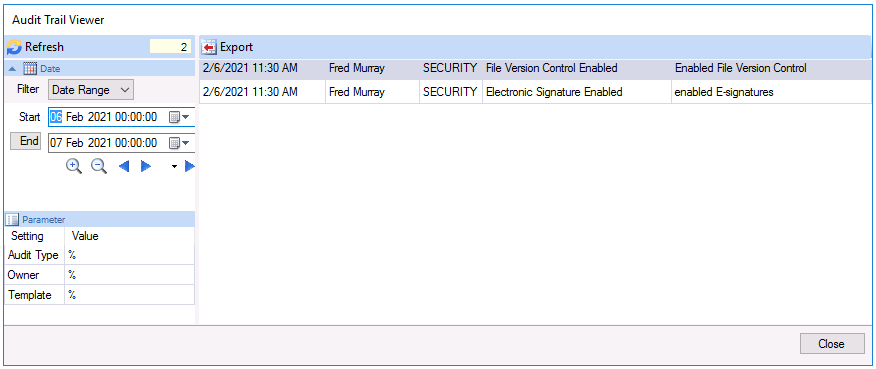 |
In the left pane, filters are used to assist in finding information. Filtering by Date, Audit Type, Owner and Template is provided.