Connector
To configure the connector, from the Project Explorer select Connect, Connectors.
Click Add
Select Rockwell Automation, FactoryTalk Alarms and Events
Click OK
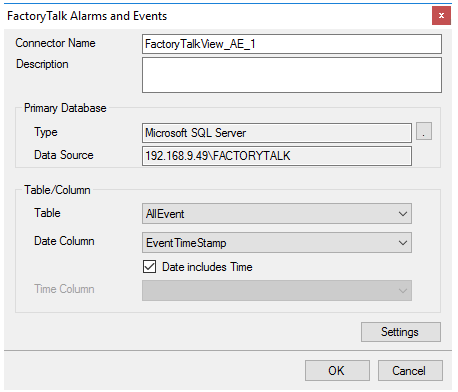
Primary Database
This defines a connection to the database where the FactoryTalk Alarm and Events server is logging data. A browse button […] is provided to define. This is always a SQL Server database.
If there are issues connecting to the database, please refer to the section in the Database Connectors document on Microsoft SQL Server.
Table/Column
Once the connection is established, specify the Table where the alarms are stored and the Date and Time Column(s). Table should be set to AllEvent and Date Column set to EventTimeStamp with Date includes Time checked.
Settings
The Settings button opens the Settings dialog that defines characteristics of the database that are used to retrieve data.
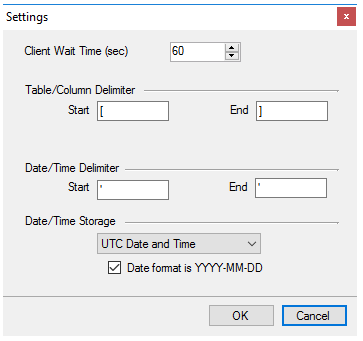 |
Typically, these settings are defaulted correctly based on SQL Server.
If queries timeout, increase the Client Wait Time.
The delimiter and timestamp settings are typically filled in automatically for the database and can be modified for other databases.
The Date/Time Storage settings define how timestamps are stored in the database. Using this setting the timestamps are manipulated when data is retrieved so that local timestamps are submitted in and returned.
Many databases require the Date format to be YYYY-MM-DD so that no interpretation needs to occur based on the Region settings of the Windows Operating System. It is recommended to always have this option checked.