Connector
To configure the connector, from the Project Explorer select Connect, Connectors.
Click Add
Select Schneider Electric Software, EcoStruxure Geo SCADA Alarms and Events
Click OK
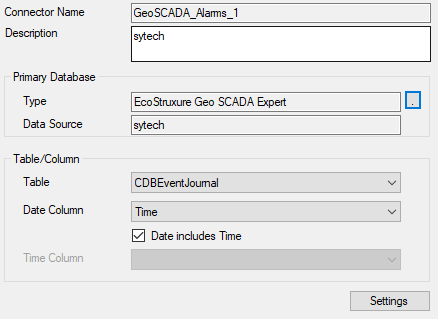
Primary Database
These settings define the connection settings for the Geo SCADA OLEDB provider. For Type, click the browse pushbutton […] to configure.
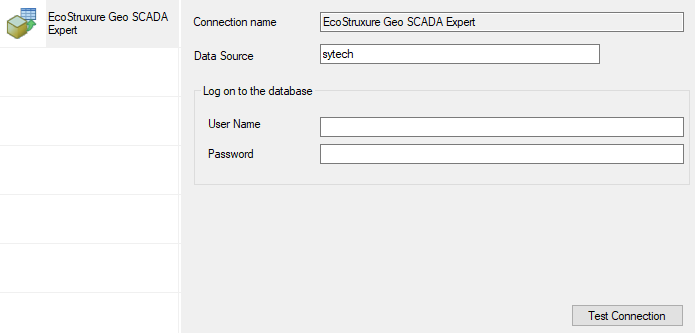
Set Date Source to the System Name as defined in the Geo SCADA Expert Client. If required, specify the User Name and Password to a valid user as configured in Geo SCADA.
Use the Test Connection button to verify a connection to the server.
Table/Column
By default. Table is set to CDBEventJournal with Date Column set to the Time column. This table contains alarm and event records where each state is logged as a separate record. For example, for an alarm there is a record when the alarm is activated, a record when it is acknowledged and a record when it becomes inactive.
As an alternative, Table can be set to CDBAlarmSummary with Date Column set to ActiveTime. This table records the entire lifecycle of an alarm in a single record. This table is only available if Alarm Summary is enabled in Geo SCADA.
To enable, open Server Configuration. Under Historic Configuration, select Alarm Summary.
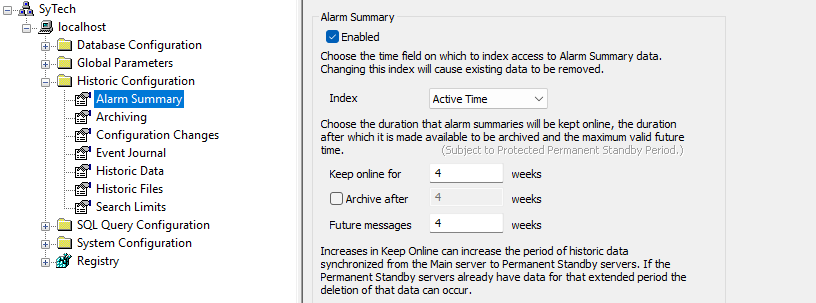
On the right side, check Enabled and specify the settings according to your system.
Note that the Table/View settings specified in the connector are used as the default. When configuring the Data Group, a different Table/View can be specified for that group.
Settings
The Settings button opens the Settings dialog that defines characteristics of the database that are used to retrieve data.
Typically, these settings are defaulted correctly based on the Geo SCADA OLEDB provider.
If queries timeout, increase the Client Wait Time.
The delimiter and timestamp settings are typically filled in automatically for the database and can be modified for other databases.
The Date/Time Storage settings define how timestamps are stored in the database. Using this setting the timestamps are manipulated when data is retrieved so that local timestamps are submitted in and returned.
Many databases require the Date format to be YYYY-MM-DD so that no interpretation needs to occur based on the Region settings of the Windows Operating System. It is recommended to always have this option checked.