Set up DeltaV
Enable Continuous Historian
To enable the Continuous Historian, open the DeltaV Explorer.
On the left side expand Physical Network, Control Network. Expand the DeltaV node and select Continuous Historian.
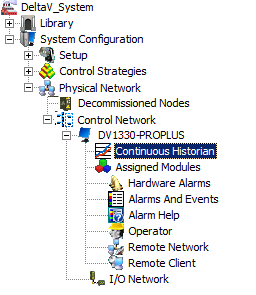 |
Right-click and select Properties.
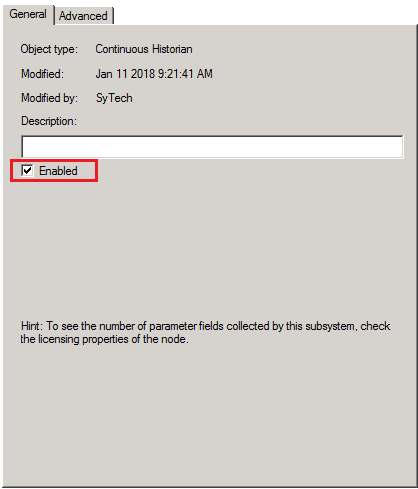 |
Under the General tab, check Enabled.
History Collection
To configure tags for history collection to the Continuous Historian, in the DeltaV Explorer, expand Physical Network, Control Network. Right click the DeltaV node and select History Collection.
Every tag configured for history collection is listed here. Click Add to add a tag to the collection.
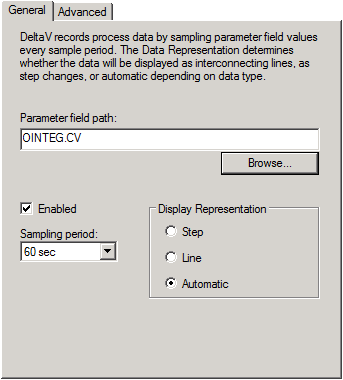 |
Under the General tab click the Browse button to specify the tag to collect.
The Sampling period defines how often a new value is logged to the historian.
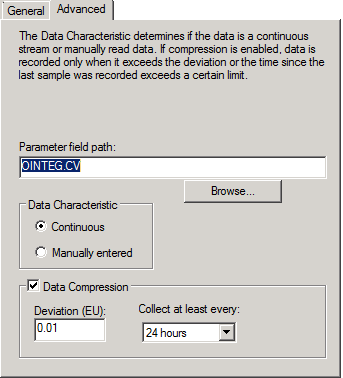 |
Under the Advanced tab, enable Data Compression to reduce the amount of data logged for the tag. The Collect at least every setting ensures that at least 1 sample is collected periodically regardless of the how the data is compressed.