Connector
To configure the connector to the FactoryTalk View SE Data Agent Data file(s), from the Project Explorer select Connect, Connectors.
Click Add
Select Rockwell Automation, FactoryTalk View SE Data Agent Data file(s)
Click OK
Connection Tab
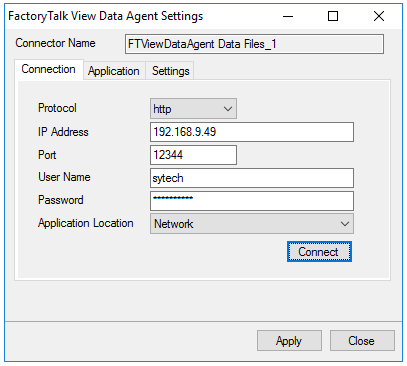 |
The settings on this tab define where the FactoryTalk View SE Data Agent is located and how to connect to it.
Setting | Description |
|---|---|
Protocol | Please note, if using https, bind the certificate to the SSL port, and then https protocol will work properly. |
IP Address | The IP address of the machine where the FactoryTalk Data Agent service is running. |
Port | The port number configured for the FactoryTalk Data Agent service. By default, this is 12344. |
User Name | A valid user name configured within the FactoryTalk View SE application. |
Password | The corresponding password for the specified User Name. |
Application Location | Once these settings are configured, click Connect to verify a connection to the FactoryTalk Data Agent. |
Application Tab
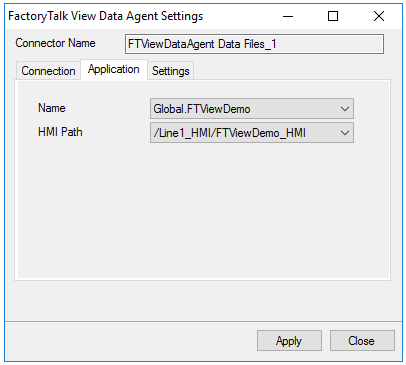 |
The settings on this tab define the FactoryTalk View SE application where data can be retrieved from.
Name
The application name. A list of applications is provided based on the settings in the Connection tab.
HMI Path
The HMI path for the Name. A list of paths is provided based on the selected Name.
Settings Tab
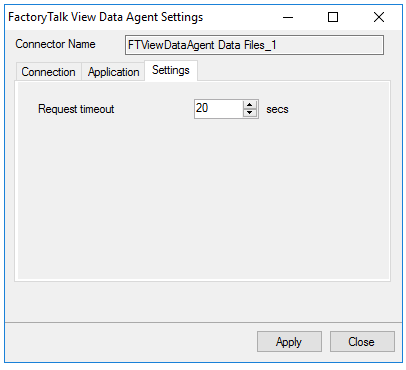 |
The settings on this tab define tuning parameters that should only be altered if there are issues connecting to or retrieving data from the FactoryTalk View SE Data Agent.
Request timeout
The number of seconds to wait for a request to complete before a timeout error occurs. The default is 20 seconds.