Heading
When Include Heading is selected on the main display, up to two headers can be included in the output of the group. To change a heading of a defined item, select the cell in the Heading column and enter the heading manually. To change a heading for a variable item, select the cell in the Heading column and click the browse pushbutton […].
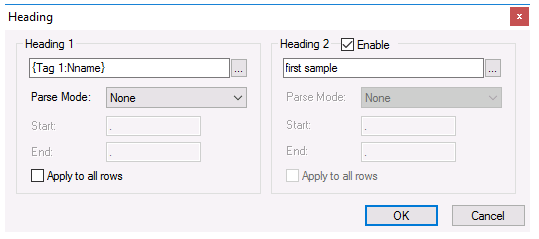 |
Headings can be fixed text, a Variable, or a combination of both. A variable would normally be used when the item name is also a variable.
When a Variable is used, sub strings can be created using the Parse Mode. The following options are available:
Before Start
Substring contains all the characters before the Start character
After End
Substring contains all the characters after the End character
Between Start and End
Substring contains all the characters between the Start the End character
When either Heading 1 or Heading 2 is a variable and the field of the variable is changed, e.g., from Nickname to Description, that change can be applied to all the other headings in the group by checking the Apply to all rows setting under the appropriate heading.