Stack Range
The Stack Range function stacks groups of columns in the Apply To range by placing the leftmost column of the group in the Placement and leaving the remaining columns in place. This function can be used to combine data logged at different intervals into a single table with sparse data.
This can be very useful if the report has multiple data sources, and you want to combine that data together into a single table to see what happened at what time. It is also useful if multiple data groups must be used to retrieve all the data required for the report.
Note that the Apply To range does not need to include the first group since that is already correctly positioned.
Settings | |
|---|---|
Rows In Header | The number of rows above the Apply To range to consider as headers. When the leftmost column of the group is stacked, the headers row(s) for that column are removed. |
Column Group Count | The number of columns for a group. |
Sort | This indicates whether or not to sort the resultant range based on the values in the column of the Placement. None indicates no sorting will be done, while Ascending and Descending apply a sort to the range. If the results are sorted, duplicate values in the Placement are combined together to form a single row. |
Example
Combine raw data for Speed, Temperature and Flow into a table with a common timestamp.
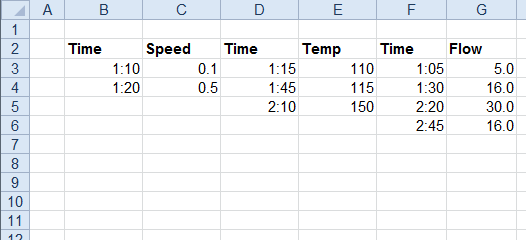
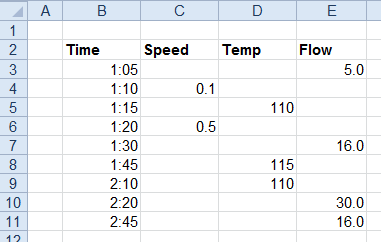
Apply To | |
|---|---|
Cell | $D$3:$G$3 |
Direction | Down |
End | All cells are empty |
Placement | |
|---|---|
Cell | $B$3 |
Setting | Value |
|---|---|
Rows In Header | 1 |
Column Group Count | 2 |
Sort | Ascending |