Data Group
The following describes the historical data group settings specific to the FactoryTalk View SE Historical Values connector.
Group Types
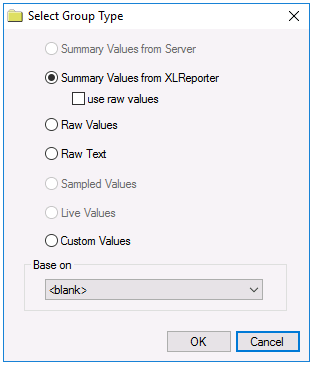 |
For FactoryTalk View SE Historical Values the following group types are available:
Summary Values from XLReporter
This group type retrieves sampled values from the database and performs calculations on those samples for reporting.
By default, summary values are calculated time weighted, and values are propagated based on the last known value. However, to change this so that summary values are calculated strictly on the data returned check use raw values.
Raw Values
This group retrieves every numeric value logged to the database between the start and end time specified.
Raw Text
This group retrieves every textual value logged to the database between the start and end time specified.
Custom Values
This option opens the Database Group builder where a query can be configured to retrieve data from any table in the database.
Group Settings
Setup Tab
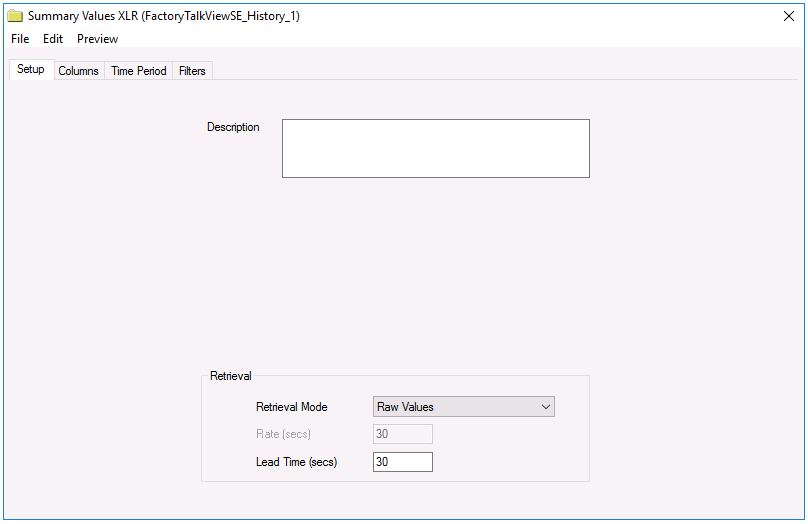 |
Retrieval (Summary Values for XLReporter Group)
The Retrieval settings define how data is retrieved for the calculations selected for the group. The following settings are available:
Retrieval Mode
This setting defines how data is retrieved from the historian. For FactoryTalk View SE only Raw Values are available.
Lead Time
The amount of time (in seconds) to retrieve data before the start time.
Filters Tab
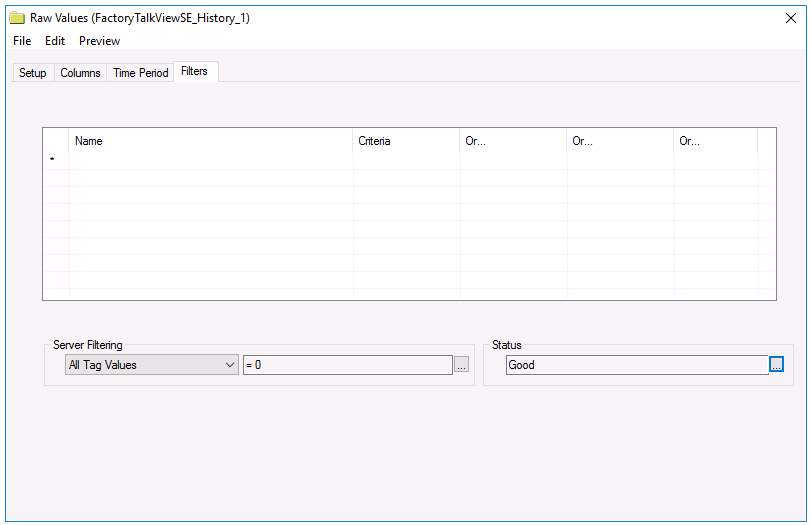 |
Server Filtering
To exclude values that do not match the criteria, set Server Filtering to All Tag Values and the condition accordingly.
The Marker column in the Float Table and String Table is used to mark different events that may affect data logging. For example, when the data log model starts, the first set of records has Marker set to B. Normally these records are included in data retrieval. To filter out these records, select Marker and set the condition to <> ‘B’. For more information about the Marker column, see the FactoryTalk View documentation.
Status Filtering (Raw Values and Raw Text Group)
For Raw Values and Raw Text group types, the Status can be filtered so only values that meet the criteria selected are retrieved. For more information on the Status types available, see the FactoryTalk View documentation.
Calculations
When calculations are performed, any value where the Status column is set to E, D or U are considered bad quality and are not included in the calculation.