Conditions
On Time
Time conditions are determined from the local operating system clock. Select one of Continuous, Daily, Weekly or Monthly and the Time.
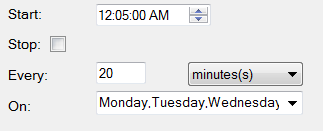
For the Continuous condition, the Start time is used as an “anchor” time.
For example: For the condition to occur 5, 25 and 45 minutes past every hour on a weekday:
 |
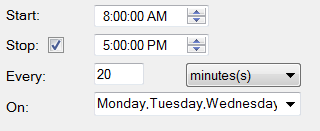
However, if the Stop time is specified then Start and Stop times limit the execution of the action to a specific period during the day.
For example: For the condition to occur every 20 minutes between 8:00am and 5:00pm on a weekday:
 |
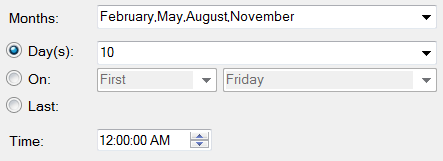
For the Monthly condition, the months of the year and the specific days of the month can be specified.
For example: For the condition to occur every 3 months starting on the 10th of February:
 |
On Event
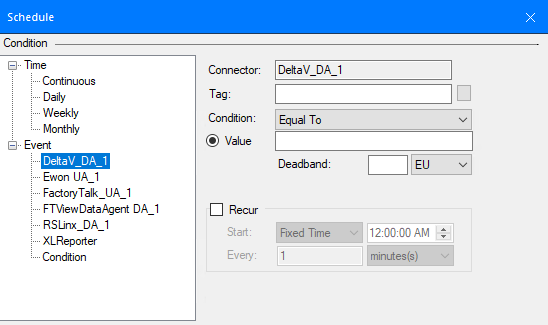
Event conditions are determined from values in real time Data Connectors, XLReporter Memory Variables, or on the Start or Stop Condition of the Scheduler. The event is triggered once when the scheduler detects the tag value transition into the event condition and can Recur if that option is enabled.
 |
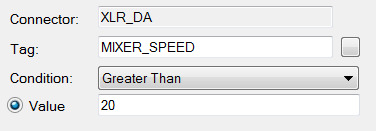
For example: For the condition to occur each time the Mixer Speed exceeds 20:
 |
XLReporter Memory Variables
There are 2 types of Memory variables available: System and User.
System
System variables provide information about the running system which can be monitored and when triggered execute specific actions. For example, the Error Message can be monitored so if it changes an email can be sent to alert the operator than an error has occurred in the reporting system.
The system variable Current Action Duration has special meaning when it is used in a schedule event condition. When an event is triggered using this variable the Action associated with the trigger is performed and the current action is stopped.
For example, when Current Action Duration is Greater Than and a Value of 60 send an email. If any Action in the Scheduler takes more than 60 seconds, an email is sent, and the current action is stopped.
User
User variables are defined in the Variable Editor and are used to hold numbers or text. These values are stored in system memory and are persistent as long as the system is running. These can be very useful for triggering schedule actions from other applications.
Condition
The following condition options are available for Events from real time Data Connectors as well as XLReporter Memory Variables.
Numeric
The numeric conditions are Equal, To, Not Equal To, Equal or Greater Than, Greater Than, Equal or Less Than, Less Than and On Change.
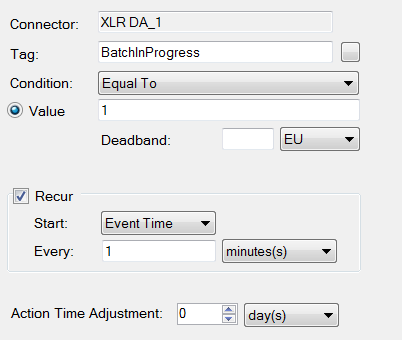
In the case of Equal and On Change a Deadband can also be specified.
For example: For the condition to occur when the Mixer Speed changes at least 5 EU (engineeering units):
 |
Text
The text conditions are IS, IS NOT, START WITH, END WITH, CONTAIN and ON CHANGE. Text conditions are case sensitive.
Recur
When the Condition is satisfied, and Recur is unchecked, the Action will be performed once.
When the Condition is satisfied, and Recur is checked, the Action will be performed periodically according to the time settings. In this case, the start time of the recur is specified as either Event Time or Fixed Time.
Event Time
The recur starts at the event time.
Fixed Time
The recur start at the specified time.
Event Condition
Event Conditions are application or file system occurrences that can be used to trigger actions.
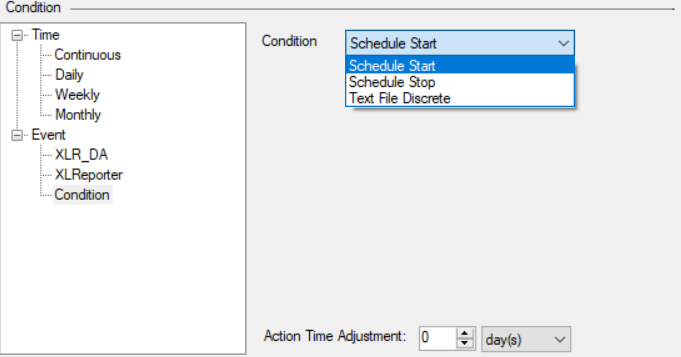
Schedule Start/Stop
These options trigger actions when the scheduler itself starts or stops.
 |
Text File Discrete
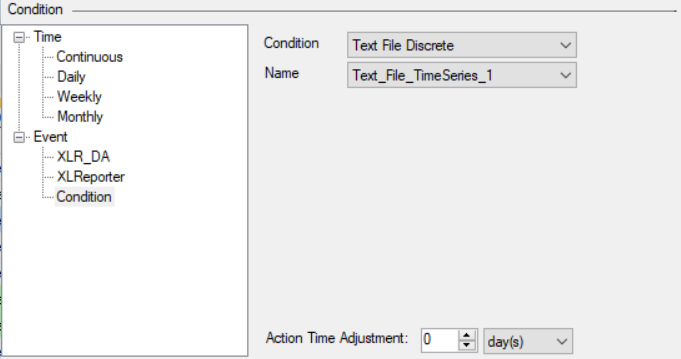 |
The Text File Discrete option provides a list of all the Text File Discrete and Text File Discrete (time series) connectors configured in the project.
If the Source File in the connection is set to Variable, any time a new file appears in the Folder specified that satisfies the Filter specified, the condition is triggered.
If the Source File in the connection is set to Fixed, any time File specified in the Folder changes (e.g., is modified), the condition is triggered.
Action Time Adjustment
The Action Time Adjustment adjusts the schedule time and the Action is then performed at this “modified” time rather than the schedule time.
This is most useful when generating reports from historical data. For example, to schedule a daily report from historical data, the report cannot be generated until the next day when all the data is available from the historian. To produce a report for the previous day set Condition to Time, Daily, 12:15:00AM and the Action Time Adjustment to 1 day(s).