Connector
To configure the connector to the DeltaV OPC UA server, from the Project Explorer select Connect, Connectors.
Click Add
Select Emerson Automation Solutions, DeltaV Real-time values (OPC UA)
Click OK
Server Tab
Under the Server tab, for Host Name, select or enter the name or IP address of the machine where the server is running.
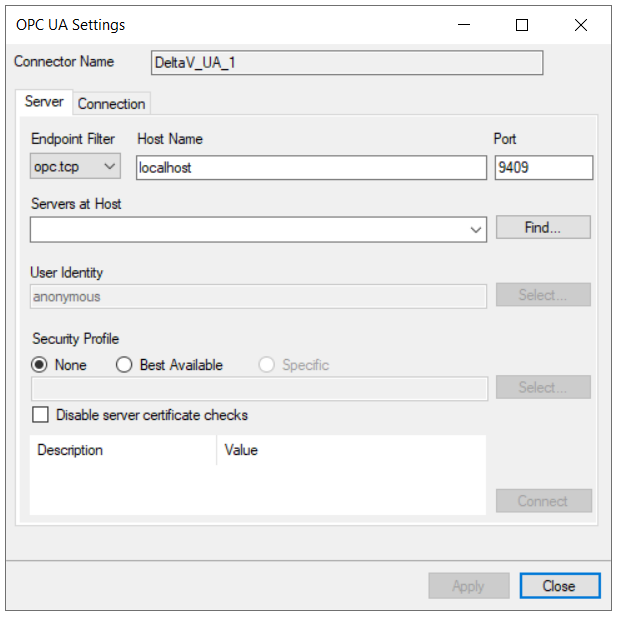 |
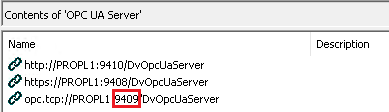
For Port specify the port found when exploring the OPC UA Server in the DeltaV Explorer. The port number appears in the URL that starts with opc.tcp:// just after the PC name.
This is typically 9409.
 |
For Servers at Host click Find and then choose opcua_server.
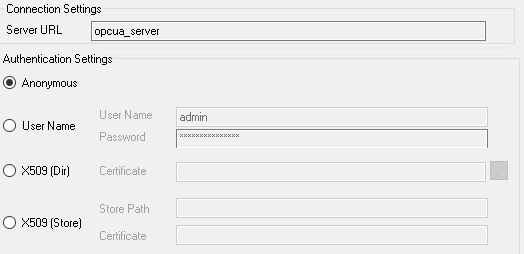
For User Identity click Select to specify.
Anonymous can be used if the Anonymous Logon setting is enabled in the OPC UA Server Properties.
 |
Security Profile defines the endpoint to connect to for the DeltaV OPC UA Server. Select the profile that matches the Security Policies set in the DeltaV OPC UA Server. To use a specific endpoint, select Specific and click the Select button.
Click Get Endpoints to get the list of available endpoints, select the one that best fits with the server settings and click OK.
Click Connect to ensure connectivity. This may require an exchange of certificates between the client and the server. If prompted to exchange, click Yes. This action requires Windows administrator rights.
If the Connect fails, be sure that the client certificate is trusted by the server and then attempt to Connect again. For more information, see the Trusted Clients section below.
The Disable server certificate checks option can be used to bypass all the checks normally done against the certifcate passed back from the OPC UA server. This is typically used if settings like the Domain or Application URI do not match what is expected but you would like to proceed with connection. Use this setting with caution as it disables many security features.
Connection Tab
Under the Connection tab are Certificate options and general Settings.
 |
The Client Certificate is automatically created on installation. If required, to recreate the certificate select Create Client Certificate. For most OPC UA servers, the default settings will be sufficient, but if the server requires more advanced certificate settings you can specify them with the Advanced button.