Data Group
The following describes the historical data group settings specific to this connector. For information on common features such as the Columns and Time Period tabs, please refer to Historical Data Groups documentation.
Group Types
Group Type
The following group types are available for this connector:
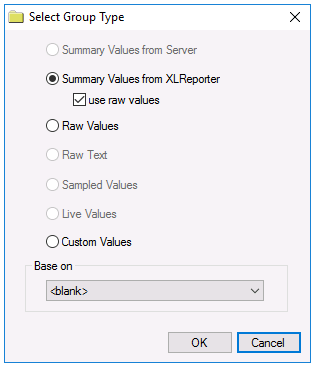 |
Summary Values from XLReporter
Summary values are calculated by XLReporter. Select use raw values to base calculations on raw values otherwise they will be based on sampled values from the Server.
Raw Values
Numeric values from the Server
Using the narrow table presented at the start of this section, a Raw Values retrieval for every tag would produce:
DateAndTime | Flow | Pressure | Speed | Temp |
|---|---|---|---|---|
1/1/2020 00:00 | 6.8 | 28.5 | 64.2 | 78.3 |
1/1/2020 00:01 | 7.2 | 28.8 | 64.8 | 78.4 |
1/1/2020 00:02 | 7.4 | 29.1 | 65.2 | 78.3 |
… | … | … | … | … |
1/1/2020 23:59 | 4.6 | 26.8 | 65.3 | 78.2 |
Custom Values
Custom values queried from any table/view in the historian database using the Database Group.
Group Settings
Setup Tab
Retrieval
The Retrieval settings is only enabled for summary values.
Retrieval Mode
This setting defines how data is retrieved from the historian. Only Raw Values are available.
Lead Time
The amount of time (in seconds) to retrieve data before the start time.
Filters Tab
Server Filtering
To exclude values that do not match the criteria are not considered, set Server Filtering to the column used for Value in connector and the condition accordingly.