By Value in Range
The By Value in Range function evaluates the Criteria specified for every value in the Apply To range and if it is satisfied, triggers the Action specified.
Settings | |
|---|---|
Action | The Action to trigger if the Criteria is satisfied. This can be UpdateBook, UpdateSheet, UpdateGroupBook or UpdateGroupSheet. |
Worksheet | If the Action is set to UpdateSheet or UpdateGroupSheet, the Worksheet must be set to the name of a worksheet in the template. |
Group | If the Action is set to UpdateGroupBook or UpdateGroupSheet, one or more Group numbers must be specified. For multiple groups, separate each with a comma. |
Criteria | The condition to check and trigger the Action if satisfied. Up to 2 conditions can be specified each of which can evaluate the value in every cell of the Apply To range. This is specified by using the Filter Browser (see Filter Range). |
Case Sensitive | If the Criteria is text based, set this to Yes to consider case when evaluating. |
Example
A daily report template is configured to show hourly averages calculated over the day from a historian. However, sometimes during the day, the primary historian may go offline and thus the data returned for that time may be bad (???). However, the system has a secondary historian which does have the data that is missing. The secondary historian should only be queried if the primary has gone offline during the day.
To accomplish this, first in the project, two connectors must be configured: one to the primary historian and one to the secondary historian.
In the report template a Data Connection is configured to retrieve the daily data from the primary historian.
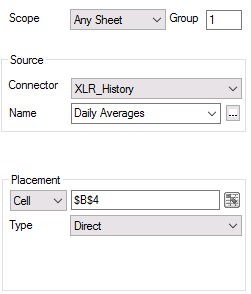 |
That connection is configured with the Group set to 1.
A second Data Connection is configured to retrieve the daily data from the secondary historian.
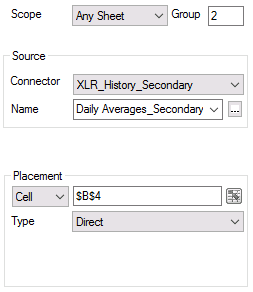 |
That connection is configured with the Group set to 2 with the exact same Placement as the first connection.
Finally, a Data Management By Value Range function is configured.
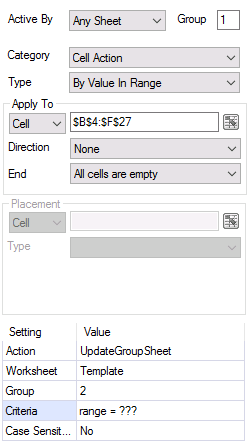 |
Notice that this connection is configured for Group 1.
The Criteria is set so if any cell in the range ($B$4:$F$27) is “???”, an UpdateGroupSheet of Group 2 is triggered which retrieves the data from the secondary historian.
To generate this report the following action is scheduled:
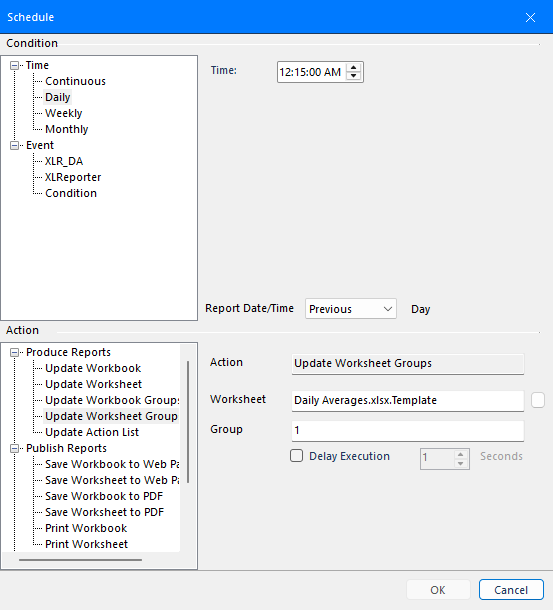
Notice that only Group 1 is updated from the Scheduler.