Trim Range
The Trim Range function trims the top and/or bottom (or left and/or right depending on Direction) of the Apply To range until the Condition is satisfied.
Settings | |
|---|---|
Start | This setting indicates if records are removed from the Top, Bottom or both the Top and Bottom. |
Condition | The Condition by which once the values in the range satisfy no other records are removed. This is specified by using the Filter Browser (see Filter Range). |
Case Sensitive | If set to Yes and the Condition is textual, case is considered, otherwise it is not. |
Delete Records | If this is set to Yes, the top and/or bottom (depending on Start) removed ranges are physically deleted from the worksheet causing cells below or to the right of the Apply To range to be shifted either upwards or leftwards depending on Direction. |
Example
Remove the rows above and below the range until the speed is greater than 10.
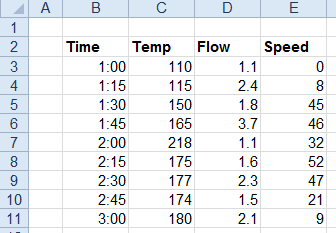
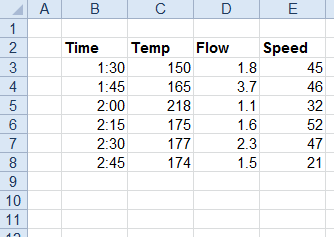
Apply To | |
|---|---|
Cell | $B$3:$E$3 |
Direction | Down |
End | All cells are empty |
Setting | |
|---|---|
Start | Top and Bottom |
Condition | $E > 10 |
Case Sensitive | No |
Delete Records | No |