Value Limit Range
The Value Limit Range function filters or color codes the Apply To range based on the Low Limit and/or High Limit specified.
Settings | |
|---|---|
Low Limit | The value by which if any value in any cell within the Apply To range is less than or equal to, that value is considered outside the limits. This can be specified as a fixed number or a cell reference. |
High Limit | The value by which if any value in any cell within the Apply To range is greater than or equal to, that value is considered outside the limits. This can be specified as a fixed number or a cell reference. |
Show Values | This setting defines what to show after the function has executed.
|
Low Format | The background color for any value less than or equal to the Low Limit. This can either be a specific color listed or a numeric color in the R,G,B format. For example, a gray background could be specified as 128,128,128. |
Between Format | The background color for any value between the Low Limit and High Limit. This can either be a specific color listed or a numeric color in the R,G,B format. For example, a gray background could be specified as 128,128,128. |
High Format | The background color for any value greater than or equal to the High Limit. This can either be a specific color listed or a numeric color in the R,G,B format. For example, a gray background could be specified as 128,128,128. |
Delete Empty Rows | This setting only applies if Show Values is set to Between Limits or Outside Limits. If set to Yes, if the function results in completely empty rows within the Apply To range, the row is deleted from the range. Otherwise, empty rows will remain in the Apply To range. |
Extend Columns | If Delete Empty Rows is set to Yes, this is the number of columns to extend to the left and right to include when deleting the rows. For example, the extend the range by 1 column to the left and 2 to the right, set this to 1,2. |
Example
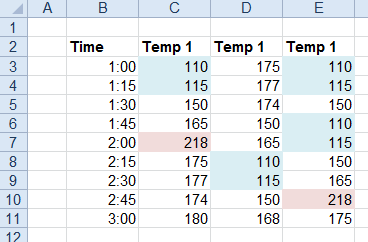
Color code temperatures below 140 and greater than 200.
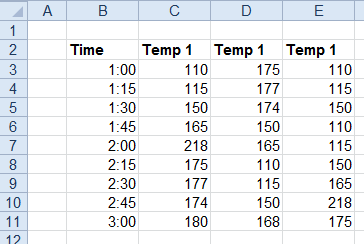
Apply To | |
|---|---|
Cell | $C$3:$E$3 |
Direction | Down |
End | All cells are empty |
Setting | Value |
|---|---|
Low Limit | 140 |
High Limit | 200 |
Show Values | All |
Low Format | Sky Blue |
Between Format | None |
High Format | Light Red |
Delete Empty Rows | No |
Extend Columns | 0,0 |