Connector
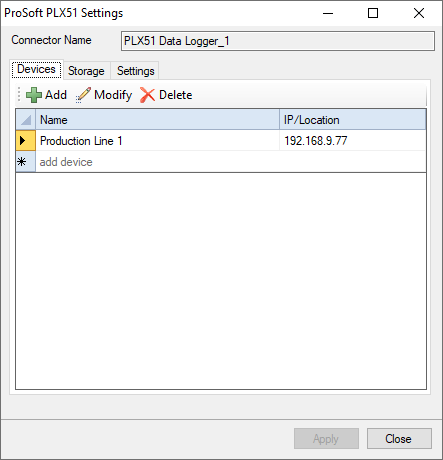 |
Devices Tab
This tab displays all the devices configured to retrieve data for the connector.
Click Add to open the Device Setup dialog and add a new device.
Device Setup
 |
For the device set Device Name to a descriptive name for the device. This name appears whenever tags are browsed for the connector.
Set IP/Location to the IP address of the device.
Click Verify Device to test connectivity and data retrieval from the device.
Storage Tab
 |
This tab displays the settings that determine where the data is stored on the local machine.
Target
The target settings determine the database where the device data is stored. A browse pushbutton […] is provided to define the connection to the database.
For applications with high data volume, a third-party database server such as Microsoft SQL Server is recommended. For small systems, a built-in Microsoft Access database is available in the \Data directory of the project.
The Purge Data option is provided to help control the size of the database.
Scan Rate
This setting defines the interval at which data is collected from the data logger devices into the Target Database.
On Apply
These options are triggered when the Apply button is clicked.
Create Database Tables creates all the necessary tables in the Target Database. If these tables already exist they will be overwritten. This setting is enabled default during initial setup of the connector.
Validate Data Transfer validates the connection between XLReporter and the REST server on each configured data logger device.
Settings Tab
 |
This tab displays the parameters of the HTTP connection to the device(s).
Protocol can be either http or https. If a secure connection is required, use https, otherwise use http.
Request timeout is the number of seconds to wait for a request to complete before a timeout error occurs. The default is 20 seconds.
Wait before request is the number of milliseconds to wait between connecting to Talk2M and requesting data. The default is 0 milliseconds.
Request retries before fail is the number of times the request is retried before it is considered an error when the request fails. The default is 2.
Request retry interval is the number of milliseconds to wait between each retry if a request fails. The default is 100.