Connector
To configure the connector to the OPC DA server, from the Project Explorer select Connect, Connectors.
Click Add
Select OPC, OPC DA Real-time values
Click OK
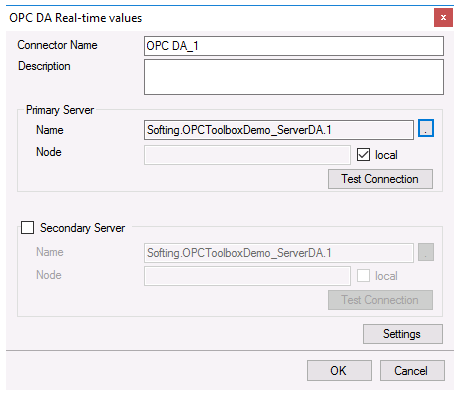 |
Primary Server
These settings define the Name and Node of the OPC DA server. A browse button is provided to browse for any available OPC DA server on the local machine or across the network.
Use the Test Connection button to verify a connection to the server.
The Secondary Server checkbox enables the (optional) secondary OPC DA that is connected if the Primary Server fails.
The Settings button is used to update tuning parameters if there are issues retrieving data from this connector.
 |
The Initial Wait setting is the amount of time (in milliseconds) the Connector waits after making a request and before retrieving data. This can be useful when communications do not respond immediately.
Retry determines how many attempts are made when bad values are returned. The default is 2 and it should typically not be changed.
Retry Time determines how the time in between retries.
Read Method determines how data is read from the server. By default, this is set to device. Cache is a faster way to read data but can cause bad quality data to be returned so only change this setting if good quality data is read.
Use Pack Integrity Authentication Level is checked when a connection is made to a remote OPCDA server that uses the packet integrity authentication level. This must be set if the Microsoft DCOM hardening has been implemented on the system where the OPCDA server is installed.