Data Connections
Alarm Management metrics are brought into reports by configuring sub reports as data connections in templates within the project. Each metric sub report is a unique data connection, so you are free to connect these in any cell in any sheet in the report. For those who have used this module in the past, this has changed. Previously, multiple metric sub reports were configured as a single connection with the target defined as part of the sub report configuration.
Data Connect
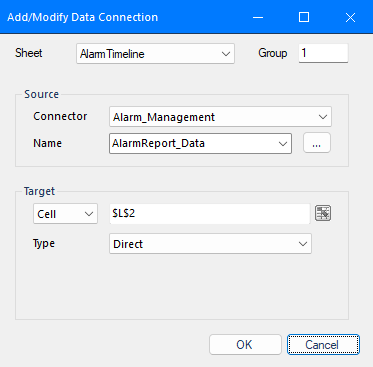 |
The Source Connector for all alarm management metric sub reports is Alarm_Management. For Name, click the browse button (…) to open the Alarm Management Sub Report dialog to define metrics.
Alarm Management Sub Reports
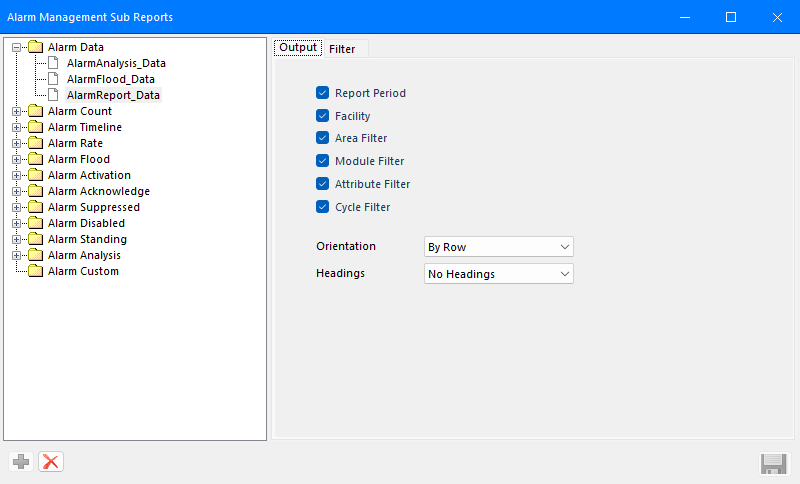 |
On the left, every defined metric sub report is listed under a specific Sub Report Category (see descriptions below).
To add a new sub report metric, select the category folder on the left and click the  button.
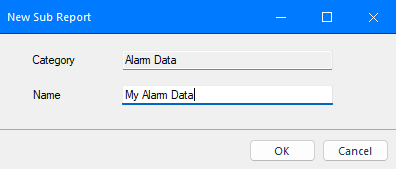 |
Specify the Name and click OK to create.
Settings for the sub report metric appear on the right side of the dialog under individual tabs. These tabs vary depending on the category as described below.