Number to Bits
Registers read from a PLC that represent a bitmask need to be expanded to their individual bits so as to give meaning to the register value e.g., an alarm register representing which alarms are active.
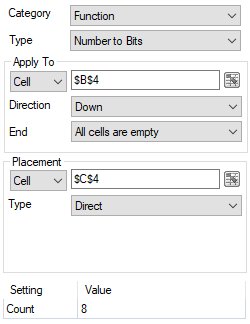 |
The Apply To is the top row of the column containing the numbers to expand. The bit setting is written to the Placement. The Count is the count of how many bits in the number will be used, e.g., a value of 62 with a Count of 5 produces 11110.
Settings | |
|---|---|
Count | A count of how many bits in the number will be used. This value cannot exceed 63 so if the value specified is greater than 63 it will be truncated. |
Example
A motor has 8 possible alarms which are represented in the PLC as the bits of an integer register. A change in the integer value causes the timestamp and value to be written in a new row starting in cells $B$4 and $C$4.
The alarm bits can be expanded in rows starting in cell $E$4 with the following configured:
Apply To | |
|---|---|
Cell | $C$4 |
Direction | Down |
End | All cells are empty |
Placement | |
|---|---|
Cell | $E$4 |
Type | Direct |
Setting | Value |
|---|---|
Count | 8 |