Outline Range
The Outline Range function removes repeating values in rows or columns (depending on Direction) in the Apply To range. The function removes repeats on the first column. It then removes repeats on the next column only if there was a repeat on the previous column. This continues until the range is completed.
Settings | |
|---|---|
Match Case | If set to Yes, when comparing textual values for repeats, the case is considered, otherwise it is not. |
Delete Empty | If set to Yes, if the empty rows or columns are left in the Apply To range, the rows or columns are deleted from the range. Otherwise, empty rows or columns will remain in the range. |
Example
Remove repeating values starting on row 3.
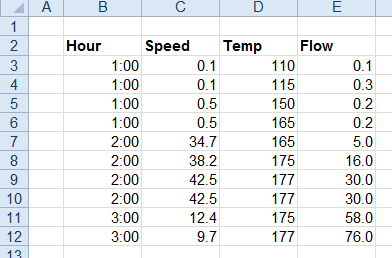

Apply To | |
|---|---|
Cell | $B$:$E$3 |
Direction | Down |
End | All cells are empty |
Setting | Value |
|---|---|
Match Case | No |
Delete Empty | No |