Licensing your WIN-911 Software
Customers will use the online WIN-911 License Portal to download and activate their license for WIN-911 Basic, PRO, Ultimate. Customers will first need to obtain their License Activation Key by registering their software. This document will help walk you through the licensing process.
Register your WIN-911 software
Prerequisites: You must have your WIN-911 Serial # (Locating Your Serial Number) and the registration contact details.
WIN-911 recommends completing the registration form as soon as possible so you can obtain your WIN-911 License Activation Key before going on-site to do the install. It can take up to one business day to review the registration form before sending back the License Activation Key. WIN-911 Software hours of operation (US headquarters): Monday through Friday, 8 a.m to 5 p.m. CST (UTC -5:00).
WIN-911 Software Registration - Use this link to register your WIN-911 Software.
Prepare to license
Prerequisites: Your WIN-911 software is installed, you have your WIN-911 License Activation Key (see Step 1 above), and you have access to the Internet.
There is an Online and Offline Licensing option. You can follow the online instructions if the WIN-911 computer has access to the Internet. If not, skip down to the Offline Licensing section.
Important
If you created any "Advanced" Notification Policies and/or Workflows during the DEMO period,and are NOT going to purchase an "Advanced" license - You must delete all Advanced policies/workflows BEFORE licensing with "Interactive."
Licensing
Online Licensing (WIN-911 machine MUST HAVE internet access)
Offline Licensing (WIN-911 machine does NOT have internet access)
Delete DEMO license and reboot
Important
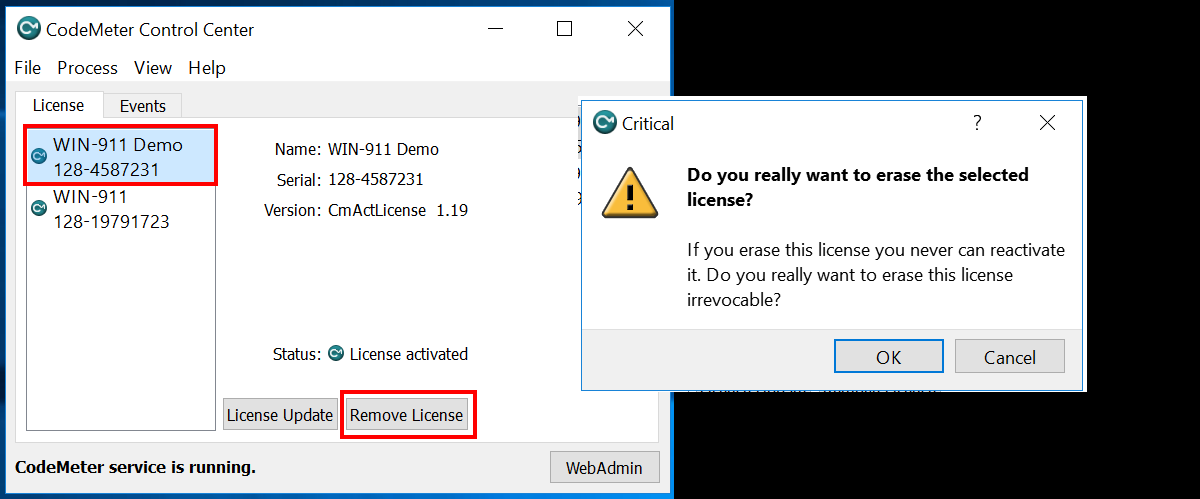
Select the “WIN-911 Demo” license container, then click the “Remove License” button. Click, OK to confirm. If the Remove License button is disabled, please see: CodeMeter Enable Remove License Button
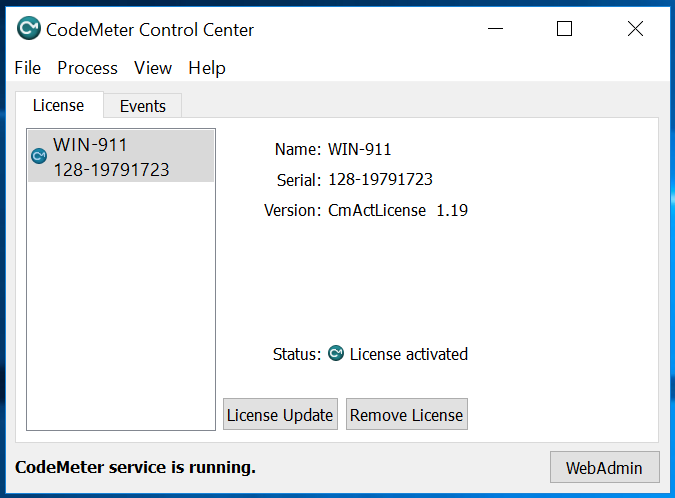
Reboot your computer for WIN-911 to start using the newly installed license.